Slide Features
A showcase of RevealJS features authored entirely in YAML using Dinghy's Slide as Code engine. All assets are embedded in a single self-contained HTML file.
Features
- Prezi-style zoom and pan (exclusive to Dinghy)
- Fragments with multiple animation styles
- Slide backgrounds — solid colour and CSS gradients
- Vertical slide stacks
- Markdown sections
- Animated code highlighting with auto-animate
- Slide transitions
- Layout helpers:
r-stack,r-fit-text,r-stretch,r-frame - Navigation links and lightbox previews
- Speaker notes
Live demo
View the published presentation at dinghy.dev/slides/revealjs-features-demo
Source Code
slides/revealjs-features-demo/slide.yml
title: RevealJS Features Demo

sections:
  - h1: RevealJS Core Features
    p: A tour of what RevealJS can do

  - title: Prezi style zoom and pan
    p:
      text: Exlcusive to Dinghy
      style: 'color: var(--r-link-color)'
    sections:
      - id: dinghy-docker
        img: sequence-diagram.png
        width: 2077
        height: 2096
        sections:
          - id: dinghy-engine-engine
            x1: 922
            y1: 80
            x2: 1215
            y2: 1279
          - id: dinghy-engine-drawio
            x1: 922
            y1: 80
            x2: 1529
            y2: 1598
          - id: title-disappear
            title: '<span style="color: red;">title disappear in 2 seconds</span>'
            overlay: 'background:rgba(154,62,62,0.2);border:2px solid red;'
            x1: 167
            y1: 80
            x2: 702
            y2: 452

  - title: Media
    sections:
      - title: Full Page Video Next
      - video: four-seconds.mp4
        id: video-background
      - title: count down sound playing
        audio:
          data-autoplay: true
          source:
            src: count-down.mp3
  - title: Fragments
    ul:
      li:
        - class: fragment
          span: Appears first
        - class: fragment fade-up
          span: Fades up second
        - class: fragment highlight-red
          span: Highlights red third
    notes: Press space or arrow to step through each fragment.

  - title: Background
    data-background-color: 'green'
    p: Set via data-background-color
    sections:
      - title: Gradient Background
        data-background: 'linear-gradient(135deg, #667eea 0%, #764ba2 100%)'
        p: Set via data-background with a CSS gradient

  - title: Vertical Slides
    p: Press ↓ to go deeper
    sections:
      - title: Level 2 — Slide A
        p: First child slide
      - title: Level 2 — Slide B
        p: Second child slide
      - title: Level 2 — Slide C
        p: Third child slide — press → to continue

  - type: markdown # needed here to support slides inside the markdown section
    markdown: |
      ## Markdown Slide 1
      A paragraph with some text and a [link](https://hakim.se).
      ---
      ## Markdown Slide 2
      ---
      ## Markdown Slide 3

  - title: Code Highlighting
    sections:
      - data-auto-animate: true
        pre:
          data-id: 'code-animation'
          code:
            data-trim: true
            data-line-numbers: true
            class: language-js
            text: |
              let planets = [
                { name: 'mars', diameter: 6779 },
              ]
      - data-auto-animate: true
        pre:
          data-id: 'code-animation'
          code:
            data-trim: true
            data-line-numbers: true
            class: language-js
            text: |
              let planets = [
                { name: 'mars', diameter: 6779 },
                { name: 'earth', diameter: 12742 },
                { name: 'jupiter', diameter: 139820 }
              ]
      - data-auto-animate: true
        pre:
          data-id: 'code-animation'
          code:
            data-trim: true
            data-line-numbers: true
            class: language-js
            text: |
              let planets = [
                { name: 'mars', diameter: 6779 },
                { name: 'earth', diameter: 12742 },
                { name: 'jupiter', diameter: 139820 }
              ]
              let circumferenceReducer = ( c, planet ) => {
                return c + planet.diameter * Math.PI;
              }

              let planets = [
                { name: 'mars', diameter: 6779 },
                { name: 'earth', diameter: 12742 },
                { name: 'jupiter', diameter: 139820 }
              ]

              let c = planets.reduce( circumferenceReducer, 0 )

  - title: Transition
    sections:
      - id: zoom
        zoom:
        data-transition: zoom
        p: zoom
      - data-transition: slide-in fade-out
        p: slide-in fade-out
      - data-transition: fade-in slide-out
        p: fade-in slide-out
      - data-transition: slide
        p: slide again

  - h1: Auto-Animate
    data-auto-animate: true
    sections:
      - data-auto-animate: true
        h1:
          text: Auto-Animate
          style: 'margin-top: 100px; color: red;'
      - data-auto-animate: true
        h1: Auto-Animate
        div:
          data-id: 'box'
          style: 'height: 50px; background: salmon;'
      - data-auto-animate: true
        div:
          data-id: 'box'
          style: 'height: 200px; background: blue;'
      - data-auto-animate: true
        div:
          data-id: 'box'
          style: 'height: 150px; background: salmon;'
      - data-auto-animate: true
        ul:
          li:
            - Mercury
            - Jupiter
            - Mars
      - data-auto-animate: true
        ul:
          li:
            - Mercury
            - Earth
            - Jupiter
            - Saturn
            - Mars

  - title: Layout
    sections:
      - title: r-stack
        div:
          class: r-stack
          img:
            - class: fragment
              src: https://picsum.photos/450/300
              style: 'width: 450px; height: 300px;'
            - class: fragment
              src: https://picsum.photos/300/450
              style: 'width: 300px; height: 450px;'
            - class: fragment
              src: https://picsum.photos/400/400
              style: 'width: 400px; height: 400px;'
      - title: r-stack individually
        div:
          class: r-stack
          img:
            - class: fragment fade-out
              src: https://picsum.photos/450/300
              style: 'width: 450px; height: 300px;'
              data-fragment-index: 0
            - class: fragment current-visible
              src: https://picsum.photos/300/450
              style: 'width: 300px; height: 450px;'
              data-fragment-index: 0
            - class: fragment
              src: https://picsum.photos/400/400
              style: 'width: 400px; height: 400px;'
      - title: r-fit-text
        h2:
          class: r-fit-text
          text: BIG
      - h2:
          class: r-fit-text
          text: FIT TEXT
      - h2:
          class: r-fit-text
          text: CAN BE USED FOR MULTIPLE HEADLINES
      - title: r-stretch
        img:
          class: r-stretch
          src: https://picsum.photos/800/600
        p: Image byline
      - title: r-frame
        div:
          img:
            src: https://picsum.photos/200
            style: 'width: 200px; height: 200px;'
          a:
            href: '#'
            img:
              class: r-frame
              src: https://picsum.photos/200
              style: 'width: 200px; height: 200px;'

  - title: Links
    ul:
      li:
        - a:
            text: '#/0 Back to the first slide'
            href: '#/0'
        - a:
            text: '#/5/1 Go to the fifth slide, second section'
            href: '#/5/1'
        - a:
            text: '#zoom Go to named slide'
            href: '#zoom'
        - button:
            - class: navigate-left
              text: Left
            - class: navigate-right
              text: Right
            - class: navigate-up
              text: Up
            - class: navigate-down
              text: Down
            - class: navigate-prev
              text: Prev
            - class: navigate-next
              text: Next
    sections:
      - title: Lightbox
        ul:
          li:
            - a:
                text: Link
                data-preview-link: true
                href: https://dinghy.dev
            - a:
                text: Image
                data-preview-image: https://picsum.photos/800/600
            - a:
                text: Video
                data-preview-video: https://static.slid.es/site/homepage/v1/homepage-video-editor.mp4

  - title: Speaker Notes
    p: Open the speaker view with S to see notes.
    notes: |
      These notes are only visible in the speaker view.
      Use them for talking points, timings, or reminders.
Steps to try
Install dinghy-cli
If you haven't already:
curl -fsSL https://get.dinghy.dev/install.sh | sh
Prepare source code
curl -fsSL --create-dirs -o slide-features/slides/revealjs-features-demo/slide.yml https://raw.githubusercontent.com/dinghydev/dinghy/main/sites/www/slides/revealjs-features-demo/slide.yml
curl -fsSL --create-dirs -o slide-features/slides/revealjs-features-demo/architecture.png https://raw.githubusercontent.com/dinghydev/dinghy/main/sites/www/slides/revealjs-features-demo/architecture.png
cd slide-features
Start the dev server
Run dinghy slide start to preview
with live reload:
dinghy slide start
Open http://localhost:3000 in your browser.
Sample Screenshot 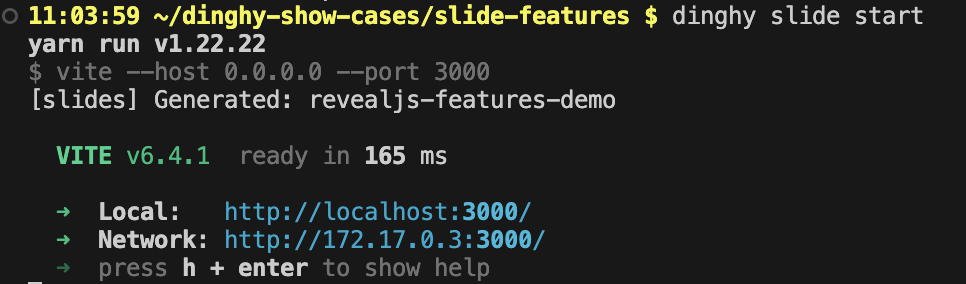
Build slides
Run dinghy slide build to produce a
self-contained HTML file where all assets (images, styles, scripts) are embedded
— ready to open directly in a browser or share as a single file:
dinghy slide build
Sample Screenshot 