IAM Roles With Policies
Easily define IAM roles and policies with minimal configuration.
Features
- Simplifies the creation of IAM roles and policies on AWS with minimal configuration
- Uses the high-level IamRoles (IamRole) composite component for easy IAM definition
- Supports defining
assume_role_serviceto auto-generate the assume role policy document - Load naming match policy from
config/iam-role-policiesfolder - Supports attaching named policies
Source Code
- my-roles.tsx
- dinghy.config.yml
import { AwsStack } from '@dinghy/tf-aws'
import { IamRoles } from '@dinghy/tf-aws/iam'

export default () => (
  <AwsStack>
    <IamRoles />
  </AwsStack>
)
# s3Backend: # if you want to use a S3 bucket as backend
#   bucket: my-unique-s3-backend-bucket
# awsProvider: # if you want to use a specific AWS region
#   region: eu-west-1
roles:
  my-first-role:
  my-second-role:
    assume_role_service: lambda.amazonaws.com # default is ec2.amazonaws.com
Policies
Policies are resolved from the config/iam-role-policies folder. For each IAM role, policies are loaded in this priority order, based on the role's name:
- my-first-role
- first.yml
- my.yml
- default.yml
- my-second-role
- my-second-role.yml
- my.yml
- default.yml
- default.tsx
- first.tsx
- my-second-role.yml
- my.tsx
# https://github.com/dinghydev/dinghy/blob/main/core/tf-aws/src/composites/iam/types.ts#RolePolicySchema
id-override-demo-policy:
  - id: override-by-id
    permission: readonly
    buckets:
      - dinghy-demo-site-overridable
eu-west-2-activated-services-all-access:
  - resources:
      - arn:aws:ec2:eu-west-2:*:*
      - arn:aws:ecs:eu-west-2:*:*
# https://github.com/dinghydev/dinghy/blob/main/core/tf-aws/src/composites/iam/types.ts#RolePolicySchema
managed-policies:
  - name: AmazonEC2ContainerRegistryPullOnly
first-role-only-buckets:
  - permission: admin
    buckets:
      - dinghy-demo-site-for-first-role
# https://github.com/dinghydev/dinghy/blob/main/core/tf-aws/src/composites/iam/types.ts#RolePolicySchema
second-role-only-buckets:
  - permission: admin
    buckets:
      - dinghy-demo-site-for-second-role
id-override-demo-policy:
  - id: override-by-id
    permission: admin
    buckets:
      - dinghy-demo-site-overridable
# https://github.com/dinghydev/dinghy/blob/main/core/tf-aws/src/composites/iam/types.ts#RolePolicySchema
buckets-for-both-roles:
  - permission: readonly
    buckets:
      - dinghy-demo-site-for-both-roles
Outputs
- Overview
- Terraform
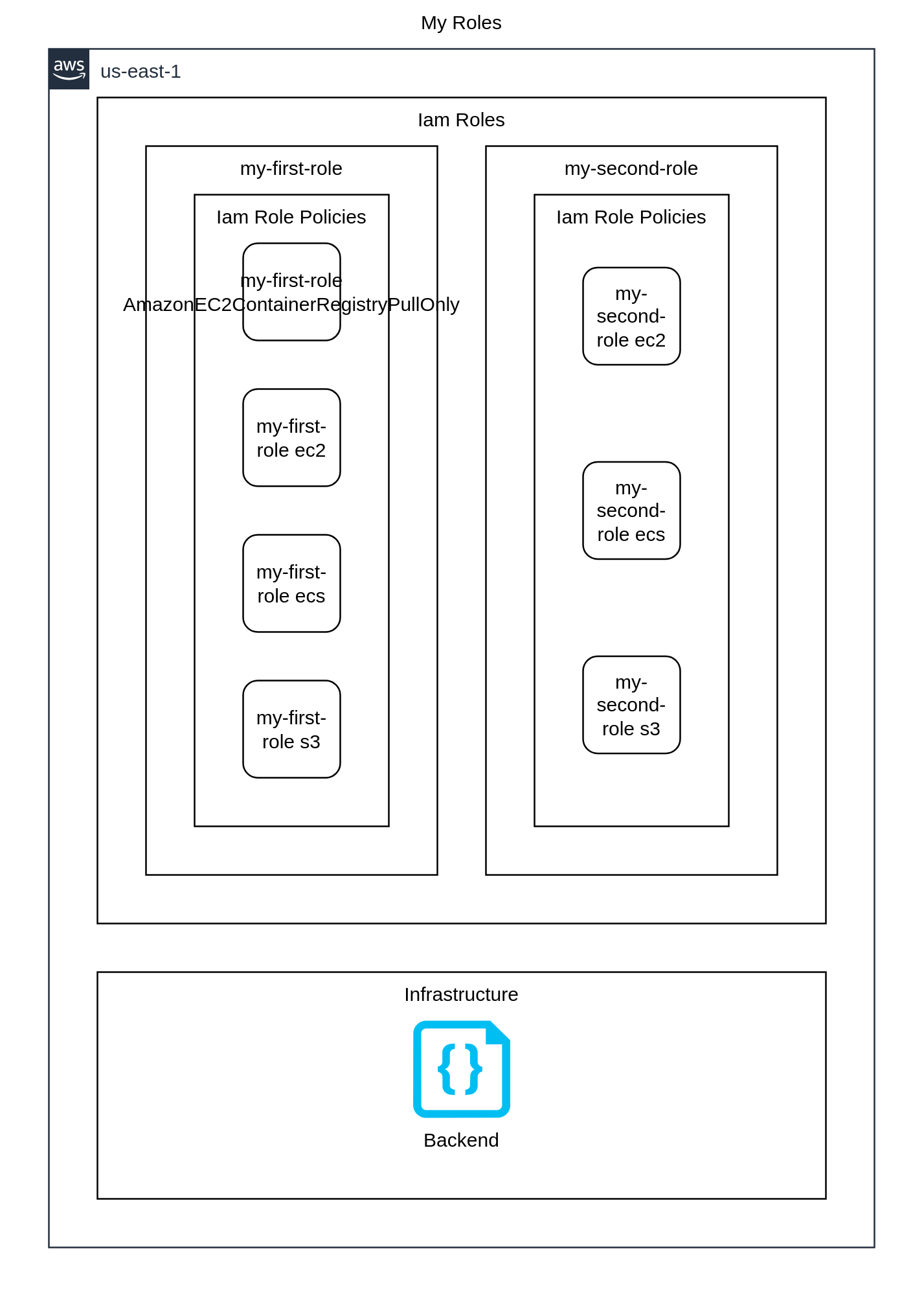
{
  "provider": {
    "aws": [
      {
        "region": "us-east-1",
        "default_tags": {
          "tags": {
            "iac:stack-title": "My Roles",
            "iac:stack-name": "my-roles"
          }
        }
      }
    ]
  },
  "terraform": {
    "required_providers": {
      "aws": {
        "source": "aws",
        "version": "6.44.0"
      }
    },
    "backend": {
      "local": {
        "path": "stack.tfstate.json"
      }
    }
  },
  "resource": {
    "aws_iam_role": {
      "awsiamrole_myfirstrole": {
        "assume_role_policy": "{\"Version\":\"2012-10-17\",\"Statement\":[{\"Effect\":\"Allow\",\"Principal\":{\"Service\":\"ec2.amazonaws.com\"},\"Action\":\"sts:AssumeRole\"}]}",
        "name": "my-first-role",
        "tags": {
          "Name": "my-first-role",
          "iac:id": "awsiamrole_myfirstrole"
        }
      },
      "awsiamrole_mysecondrole": {
        "assume_role_policy": "{\"Version\":\"2012-10-17\",\"Statement\":[{\"Effect\":\"Allow\",\"Principal\":{\"Service\":\"lambda.amazonaws.com\"},\"Action\":\"sts:AssumeRole\"}]}",
        "name": "my-second-role",
        "tags": {
          "Name": "my-second-role",
          "iac:id": "awsiamrole_mysecondrole"
        }
      }
    },
    "aws_iam_role_policy_attachment": {
      "awsiamrolepolicyattachment_myfirstroleamazonec2containerregistrypullonly": {
        "depends_on": [
          "aws_iam_role.awsiamrole_myfirstrole"
        ],
        "policy_arn": "arn:aws:iam::aws:policy/AmazonEC2ContainerRegistryPullOnly",
        "role": "my-first-role"
      }
    },
    "aws_iam_role_policy": {
      "awsiamrolepolicy_myfirstroleec2": {
        "depends_on": [
          "aws_iam_role.awsiamrole_myfirstrole"
        ],
        "policy": "{\"Version\":\"2012-10-17\",\"Statement\":[{\"Effect\":\"Allow\",\"Action\":[\"ec2:*\"],\"Resource\":[\"arn:aws:ec2:eu-west-2:*:*\"]}]}",
        "role": "my-first-role",
        "name": "ec2"
      },
      "awsiamrolepolicy_myfirstroleecs": {
        "depends_on": [
          "aws_iam_role.awsiamrole_myfirstrole"
        ],
        "policy": "{\"Version\":\"2012-10-17\",\"Statement\":[{\"Effect\":\"Allow\",\"Action\":[\"ecs:*\"],\"Resource\":[\"arn:aws:ecs:eu-west-2:*:*\"]}]}",
        "role": "my-first-role",
        "name": "ecs"
      },
      "awsiamrolepolicy_myfirstroles3": {
        "depends_on": [
          "aws_iam_role.awsiamrole_myfirstrole"
        ],
        "policy": "{\"Version\":\"2012-10-17\",\"Statement\":[{\"Effect\":\"Allow\",\"Action\":[\"s3:Get*\"],\"Resource\":[\"arn:aws:s3:::dinghy-demo-site-for-both-roles/*\",\"arn:aws:s3:::dinghy-demo-site-overridable/*\"]},{\"Effect\":\"Allow\",\"Action\":[\"s3:*\"],\"Resource\":[\"arn:aws:s3:::dinghy-demo-site-for-both-roles\",\"arn:aws:s3:::dinghy-demo-site-for-first-role\",\"arn:aws:s3:::dinghy-demo-site-for-first-role/*\",\"arn:aws:s3:::dinghy-demo-site-overridable\"]}]}",
        "role": "my-first-role",
        "name": "s3"
      },
      "awsiamrolepolicy_mysecondroleec2": {
        "depends_on": [
          "aws_iam_role.awsiamrole_mysecondrole"
        ],
        "policy": "{\"Version\":\"2012-10-17\",\"Statement\":[{\"Effect\":\"Allow\",\"Action\":[\"ec2:*\"],\"Resource\":[\"arn:aws:ec2:eu-west-2:*:*\"]}]}",
        "role": "my-second-role",
        "name": "ec2"
      },
      "awsiamrolepolicy_mysecondroleecs": {
        "depends_on": [
          "aws_iam_role.awsiamrole_mysecondrole"
        ],
        "policy": "{\"Version\":\"2012-10-17\",\"Statement\":[{\"Effect\":\"Allow\",\"Action\":[\"ecs:*\"],\"Resource\":[\"arn:aws:ecs:eu-west-2:*:*\"]}]}",
        "role": "my-second-role",
        "name": "ecs"
      },
      "awsiamrolepolicy_mysecondroles3": {
        "depends_on": [
          "aws_iam_role.awsiamrole_mysecondrole"
        ],
        "policy": "{\"Version\":\"2012-10-17\",\"Statement\":[{\"Effect\":\"Allow\",\"Action\":[\"s3:*\"],\"Resource\":[\"arn:aws:s3:::dinghy-demo-site-for-both-roles\",\"arn:aws:s3:::dinghy-demo-site-for-second-role\",\"arn:aws:s3:::dinghy-demo-site-for-second-role/*\",\"arn:aws:s3:::dinghy-demo-site-overridable\",\"arn:aws:s3:::dinghy-demo-site-overridable\",\"arn:aws:s3:::dinghy-demo-site-overridable/*\",\"arn:aws:s3:::dinghy-demo-site-overridable/*\"]},{\"Effect\":\"Allow\",\"Action\":[\"s3:Get*\"],\"Resource\":[\"arn:aws:s3:::dinghy-demo-site-for-both-roles/*\"]}]}",
        "role": "my-second-role",
        "name": "s3"
      }
    }
  }
}
Resource types
List of resource types used by this stack, in approximate order of creation:
Steps to try
Install dinghy-cli
If you haven't already:
curl -fsSL https://get.dinghy.dev/install.sh | sh
Sample Screenshot
Prepare source code
Create my-roles.tsx and dinghy.config.yml files with content from above.
curl -fsSL --create-dirs -o iam-roles/my-roles.tsx https://raw.githubusercontent.com/dinghydev/dinghy/main/sites/www/src/docs/examples/show-cases/iam-roles/my-roles.tsx
curl -fsSL --create-dirs -o iam-roles/dinghy.config.yml https://raw.githubusercontent.com/dinghydev/dinghy/main/sites/www/src/docs/examples/show-cases/iam-roles/dinghy.config.yml
curl -fsSL --create-dirs -o iam-roles/config/iam-role-policies/default.yml https://raw.githubusercontent.com/dinghydev/dinghy/main/sites/www/src/docs/examples/show-cases/iam-roles/config/iam-role-policies/default.yml
curl -fsSL --create-dirs -o iam-roles/config/iam-role-policies/first.yml https://raw.githubusercontent.com/dinghydev/dinghy/main/sites/www/src/docs/examples/show-cases/iam-roles/config/iam-role-policies/first.yml
curl -fsSL --create-dirs -o iam-roles/config/iam-role-policies/my-second-role.yml https://raw.githubusercontent.com/dinghydev/dinghy/main/sites/www/src/docs/examples/show-cases/iam-roles/config/iam-role-policies/my-second-role.yml
curl -fsSL --create-dirs -o iam-roles/config/iam-role-policies/my.yml https://raw.githubusercontent.com/dinghydev/dinghy/main/sites/www/src/docs/examples/show-cases/iam-roles/config/iam-role-policies/my.yml
cd iam-roles
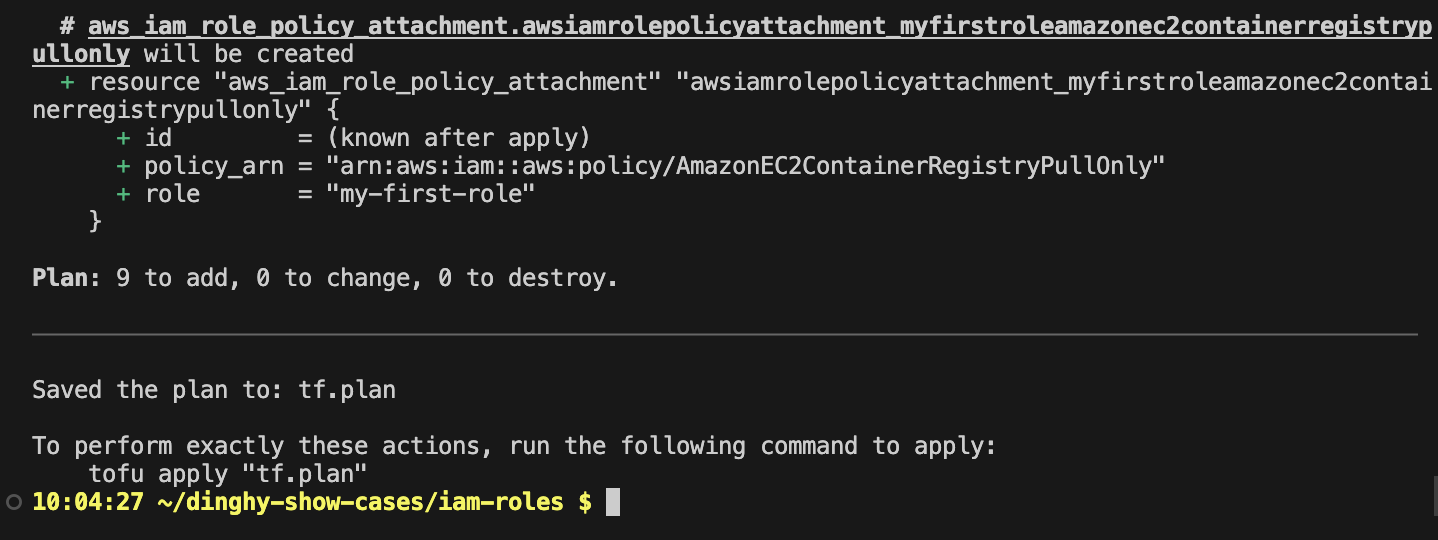
Preview the actions
Run dinghy tf diff to preview the Terraform actions that will be performed.
Make sure your AWS credentials are configured before interacting with AWS services.
dinghy tf diff
Sample Screenshot
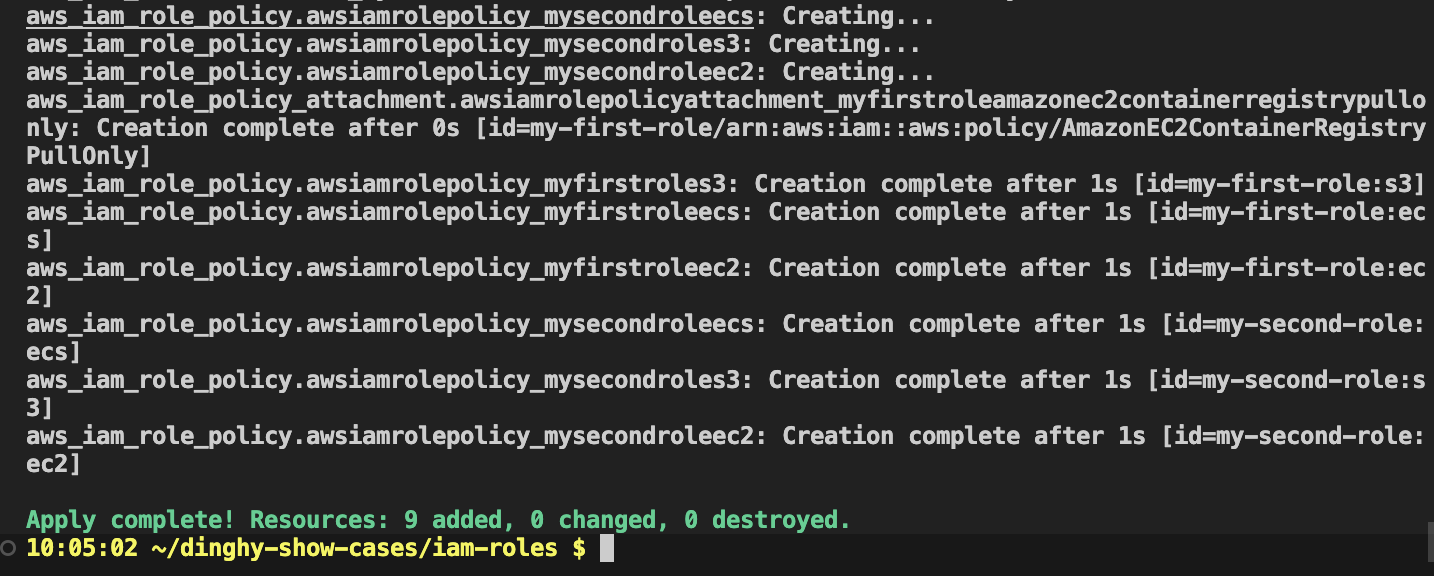
Apply the actions
Run dinghy tf deploy to apply the changes and provision your resources.
dinghy tf deploy
Sample Screenshot
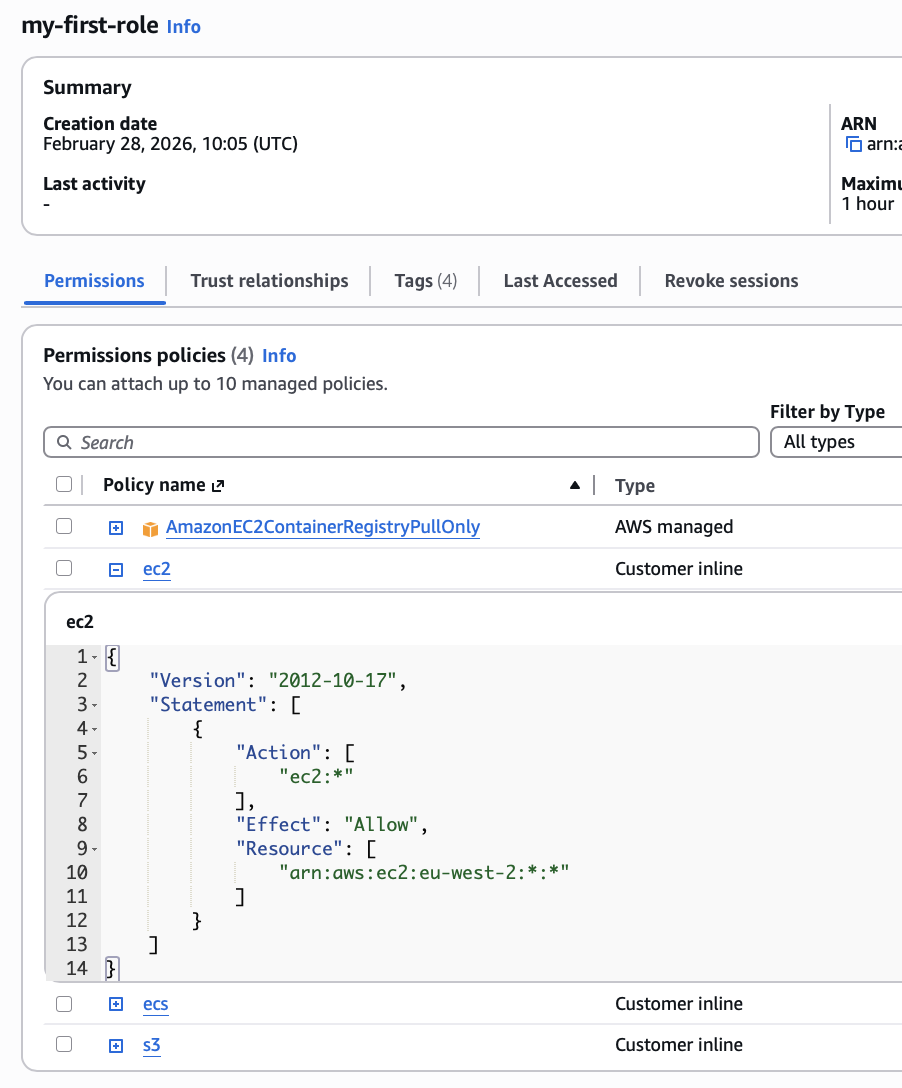
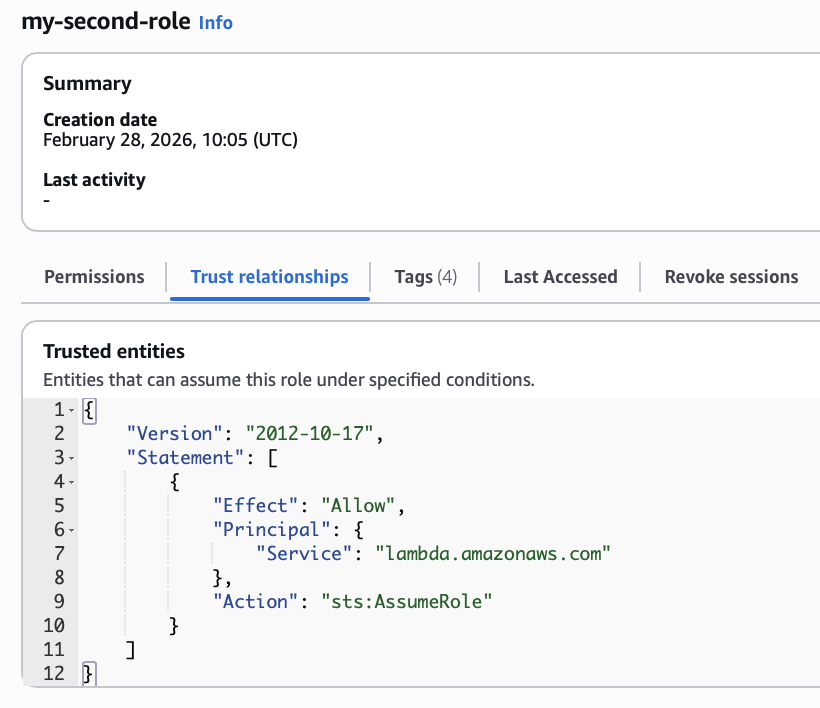
Created Roles
The inline policy details are clearly organized by service.
my-first-role
my-second-role
Destroy resources
After experimenting, run dinghy tf destroy to remove all resources created in the previous steps.