EC2 Servers
With 10 lines of code to create an EC2 server.
Features
- Simplifies the creation of EC2 servers on AWS with minimal configuration
- Uses the high-level Ec2Servers (schema) composite component for easy infrastructure definition
- Supports customization of instance type (e.g., ARM or AMD architectures)
- Lets you choose Linux flavor (Amazon Linux 2023 or Ubuntu)
- Handles networking setup automatically: VPC, subnet, internet gateway, routing
- Automatically creates a public web traffic security group for your server when a public IP is enabled
- Automatically manages IAM roles and permissions for your EC2 instances
- Managing your servers securely with AWS Session Manager without
SSH - Generates standard Terraform code as an output alongside visual diagrams
Source Code
- my-server.tsx
- dinghy.config.yml
import { AwsStack } from '@dinghy/tf-aws'
import { Ec2Servers } from '@dinghy/tf-aws/ec2'

export default () => (
  <AwsStack>
    <Ec2Servers />
  </AwsStack>
)
# s3Backend: # if you want to use a S3 bucket as backend
#   bucket: my-unique-s3-backend-bucket
# awsProvider: # if you want to use a specific AWS region
#   region: eu-west-1
# servers:
#   my-server: # server name default to tsx file name without extension
#     # schema reference: https://registry.terraform.io/providers/hashicorp/aws/latest/docs/resources/instance
#     instance_type: t4g.nano # change to arm64 architecture instance type. Default is t3.nano which is amd64
#     linuxFlavor: ubuntu # default is al2023 which is amazon linux 2023
#     root_block_device:
#       volume_size: 100 # default is 8GB
#   my-server-2: # another server will be created with a different name
Outputs
- Overview
- All View
- Terraform
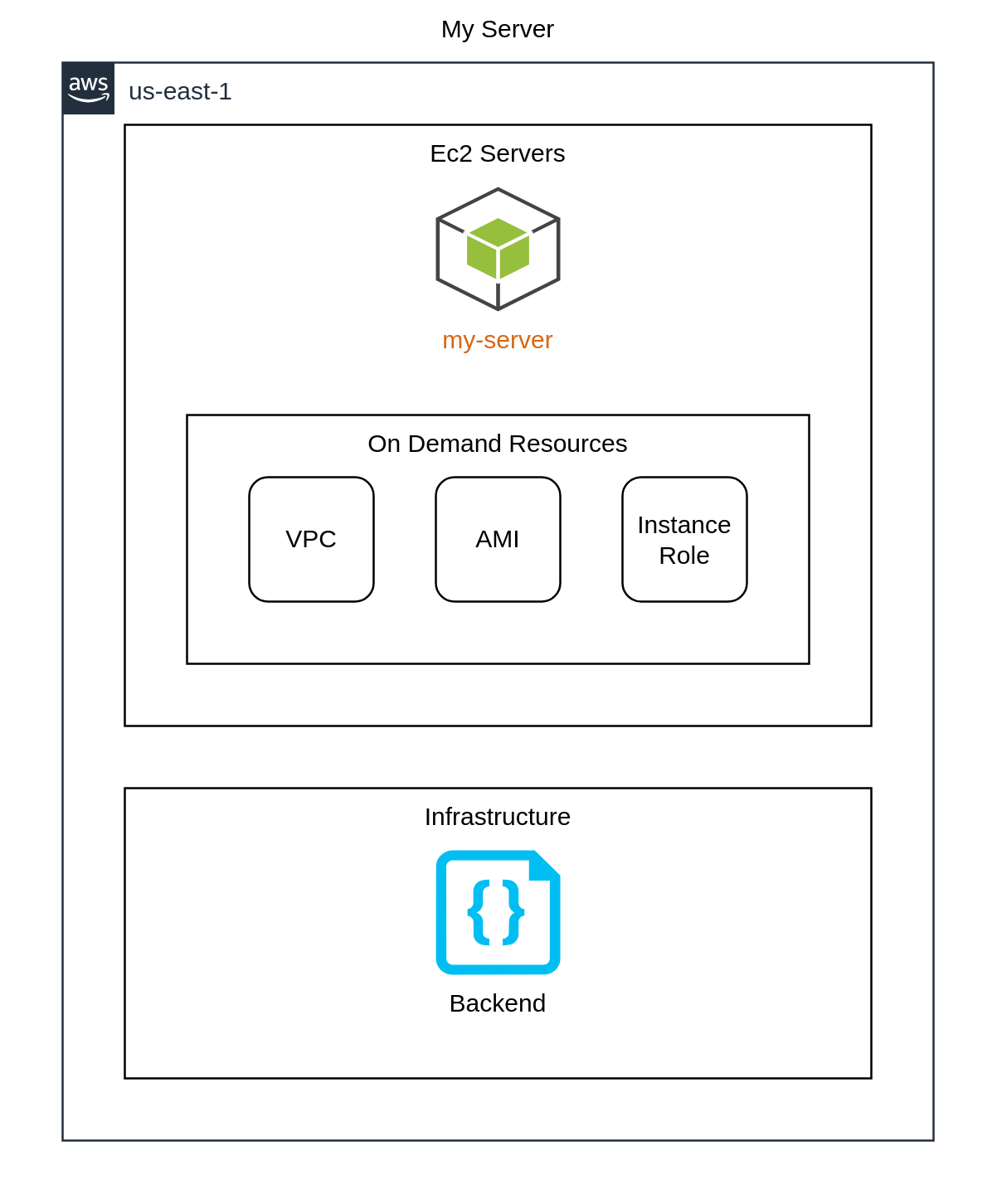
All elements without filter 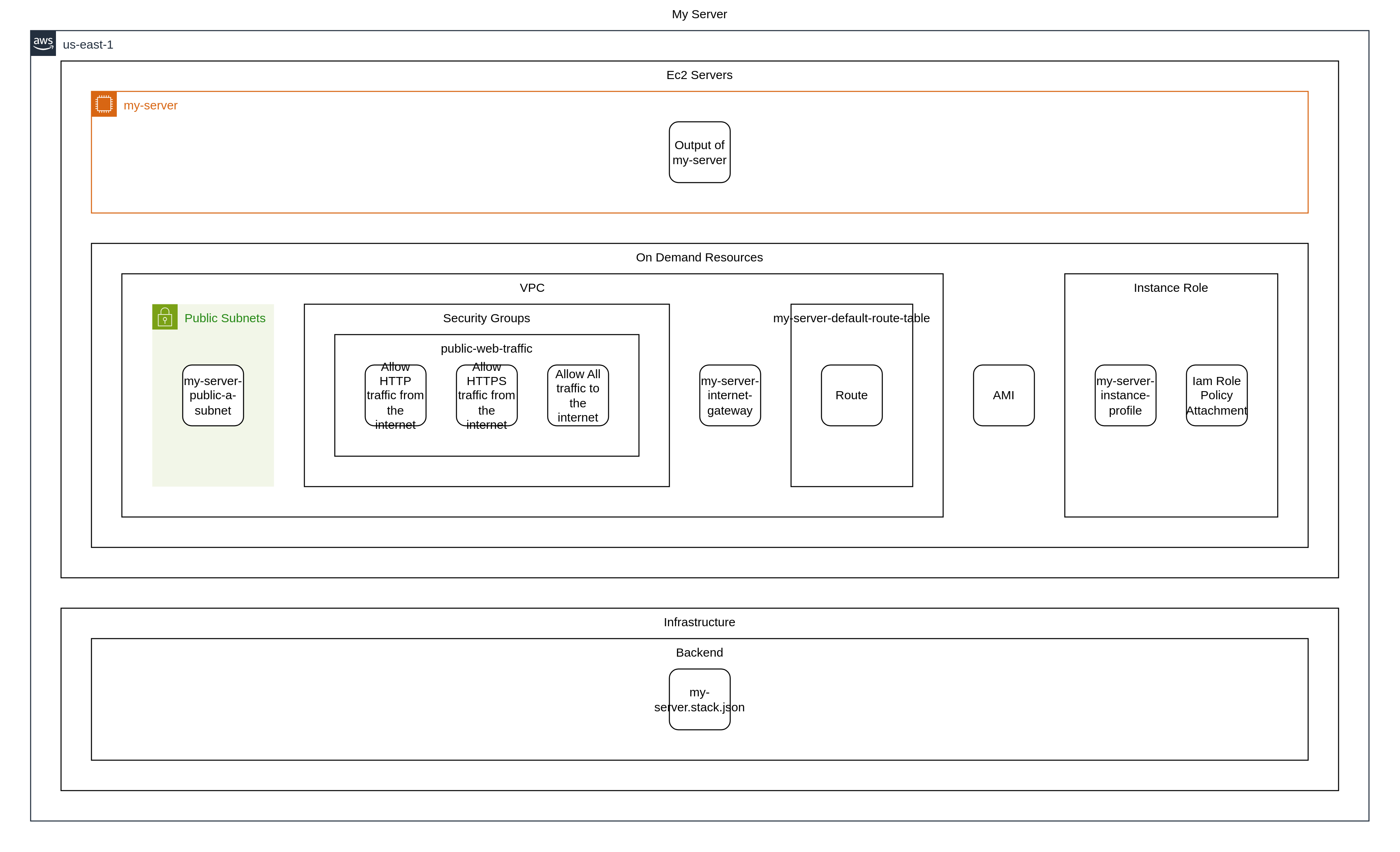
stack.tf.json
{
  "provider": {
    "aws": [
      {
        "region": "us-east-1",
        "default_tags": {
          "tags": {
            "iac:stack-title": "My Server",
            "iac:stack-name": "my-server"
          }
        }
      }
    ]
  },
  "terraform": {
    "required_providers": {
      "aws": {
        "source": "aws",
        "version": "6.44.0"
      },
      "local": {
        "source": "local",
        "version": "2.6.1"
      }
    },
    "backend": {
      "local": {
        "path": "stack.tfstate.json"
      }
    }
  },
  "resource": {
    "aws_instance": {
      "awsinstance_myserver": {
        "lifecycle": {
          "ignore_changes": [
            "ami"
          ]
        },
        "ami": "${data.aws_ami.awsami_ami.id}",
        "associate_public_ip_address": true,
        "iam_instance_profile": "${aws_iam_instance_profile.awsiaminstanceprofile_myserverinstanceprofile.name}",
        "instance_type": "t3.nano",
        "subnet_id": "${aws_subnet.awssubnet_myserverpublicasubnet.id}",
        "vpc_security_group_ids": [
          "${aws_security_group.awssecuritygroup_publicwebtraffic.id}"
        ],
        "depends_on": [
          "aws_iam_instance_profile.awsiaminstanceprofile_myserverinstanceprofile",
          "aws_subnet.awssubnet_myserverpublicasubnet",
          "aws_security_group.awssecuritygroup_publicwebtraffic"
        ],
        "tags": {
          "Name": "my-server",
          "iac:id": "awsinstance_myserver"
        }
      }
    },
    "aws_vpc": {
      "awsvpc_myservervpc": {
        "cidr_block": "10.10.0.0/16",
        "tags": {
          "Name": "my-server-vpc",
          "iac:id": "awsvpc_myservervpc"
        }
      }
    },
    "aws_subnet": {
      "awssubnet_myserverpublicasubnet": {
        "vpc_id": "${aws_vpc.awsvpc_myservervpc.id}",
        "availability_zone": "us-east-1a",
        "cidr_block": "10.10.200.0/24",
        "depends_on": [
          "aws_vpc.awsvpc_myservervpc"
        ],
        "tags": {
          "Name": "my-server-public-a-subnet",
          "iac:id": "awssubnet_myserverpublicasubnet"
        }
      }
    },
    "aws_security_group": {
      "awssecuritygroup_publicwebtraffic": {
        "name": "public-web-traffic",
        "vpc_id": "${aws_vpc.awsvpc_myservervpc.id}",
        "depends_on": [
          "aws_vpc.awsvpc_myservervpc"
        ],
        "tags": {
          "Name": "public-web-traffic",
          "iac:id": "awssecuritygroup_publicwebtraffic"
        }
      }
    },
    "aws_vpc_security_group_ingress_rule": {
      "awsvpcsecuritygroupingressrule_allowhttptrafficfromtheinternet": {
        "ip_protocol": "tcp",
        "security_group_id": "${aws_security_group.awssecuritygroup_publicwebtraffic.id}",
        "cidr_ipv4": "0.0.0.0/0",
        "description": "Allow HTTP traffic from the internet",
        "from_port": 80,
        "to_port": 80,
        "depends_on": [
          "aws_security_group.awssecuritygroup_publicwebtraffic"
        ],
        "tags": {
          "Name": "Allow HTTP traffic from the internet",
          "iac:id": "awsvpcsecuritygroupingressrule_allowhttptrafficfromtheinternet"
        }
      },
      "awsvpcsecuritygroupingressrule_allowhttpstrafficfromtheinternet": {
        "ip_protocol": "tcp",
        "security_group_id": "${aws_security_group.awssecuritygroup_publicwebtraffic.id}",
        "cidr_ipv4": "0.0.0.0/0",
        "description": "Allow HTTPS traffic from the internet",
        "from_port": 443,
        "to_port": 443,
        "depends_on": [
          "aws_security_group.awssecuritygroup_publicwebtraffic"
        ],
        "tags": {
          "Name": "Allow HTTPS traffic from the internet",
          "iac:id": "awsvpcsecuritygroupingressrule_allowhttpstrafficfromtheinternet"
        }
      }
    },
    "aws_vpc_security_group_egress_rule": {
      "awsvpcsecuritygroupegressrule_allowalltraffictotheinternet": {
        "ip_protocol": "-1",
        "security_group_id": "${aws_security_group.awssecuritygroup_publicwebtraffic.id}",
        "cidr_ipv4": "0.0.0.0/0",
        "description": "Allow All traffic to the internet",
        "from_port": 0,
        "to_port": 0,
        "depends_on": [
          "aws_security_group.awssecuritygroup_publicwebtraffic"
        ],
        "tags": {
          "Name": "Allow All traffic to the internet",
          "iac:id": "awsvpcsecuritygroupegressrule_allowalltraffictotheinternet"
        }
      }
    },
    "aws_internet_gateway": {
      "awsinternetgateway_myserverinternetgateway": {
        "vpc_id": "${aws_vpc.awsvpc_myservervpc.id}",
        "depends_on": [
          "aws_vpc.awsvpc_myservervpc"
        ],
        "tags": {
          "Name": "my-server-internet-gateway",
          "iac:id": "awsinternetgateway_myserverinternetgateway"
        }
      }
    },
    "aws_default_route_table": {
      "awsdefaultroutetable_myserverdefaultroutetable": {
        "default_route_table_id": "${aws_vpc.awsvpc_myservervpc.default_route_table_id}",
        "depends_on": [
          "aws_vpc.awsvpc_myservervpc"
        ],
        "tags": {
          "Name": "my-server-default-route-table",
          "iac:id": "awsdefaultroutetable_myserverdefaultroutetable"
        }
      }
    },
    "aws_route": {
      "awsroute_route": {
        "route_table_id": "${aws_vpc.awsvpc_myservervpc.default_route_table_id}",
        "destination_cidr_block": "0.0.0.0/0",
        "gateway_id": "${aws_internet_gateway.awsinternetgateway_myserverinternetgateway.id}",
        "depends_on": [
          "aws_vpc.awsvpc_myservervpc",
          "aws_internet_gateway.awsinternetgateway_myserverinternetgateway"
        ]
      }
    },
    "aws_iam_role": {
      "awsiamrole_myserverrole": {
        "assume_role_policy": "{\"Version\":\"2012-10-17\",\"Statement\":[{\"Effect\":\"Allow\",\"Principal\":{\"Service\":\"ec2.amazonaws.com\"},\"Action\":\"sts:AssumeRole\"}]}",
        "name": "my-server-role",
        "tags": {
          "Name": "my-server-role",
          "iac:id": "awsiamrole_myserverrole"
        }
      }
    },
    "aws_iam_instance_profile": {
      "awsiaminstanceprofile_myserverinstanceprofile": {
        "depends_on": [
          "aws_iam_role.awsiamrole_myserverrole"
        ],
        "role": "my-server-role",
        "tags": {
          "Name": "my-server-instance-profile",
          "iac:id": "awsiaminstanceprofile_myserverinstanceprofile"
        }
      }
    },
    "aws_iam_role_policy_attachment": {
      "awsiamrolepolicyattachment_myserverroleamazonssmmanagedinstancecore": {
        "depends_on": [
          "aws_iam_role.awsiamrole_myserverrole"
        ],
        "policy_arn": "arn:aws:iam::aws:policy/AmazonSSMManagedInstanceCore",
        "role": "my-server-role"
      }
    },
    "local_file": {
      "localfile_myserverstackjson": {
        "filename": "my-server.stack.json",
        "content": "${jsonencode({\n  \"awsinstance_myserver_output\" = { \"Name\" = \"my-server\", \"InstanceId\" = aws_instance.awsinstance_myserver.id, \"PublicIp\" = aws_instance.awsinstance_myserver.public_ip, \"Region\" = aws_instance.awsinstance_myserver.region }\n})}"
      }
    }
  },
  "output": {
    "awsinstance_myserver_output": {
      "value": "{\"Name\":\"my-server\",\"InstanceId\":\"${aws_instance.awsinstance_myserver.id}\",\"PublicIp\":\"${aws_instance.awsinstance_myserver.public_ip}\",\"Region\":\"${aws_instance.awsinstance_myserver.region}\"}",
      "description": "Output of my-server",
      "depends_on": [
        "aws_instance.awsinstance_myserver"
      ]
    }
  },
  "data": {
    "aws_ami": {
      "awsami_ami": {
        "filter": [
          {
            "name": "architecture",
            "values": [
              "x86_64"
            ]
          }
        ],
        "most_recent": true,
        "name_regex": "^al2023-ami-\\d{4}.*",
        "owners": [
          "amazon"
        ]
      }
    }
  }
}
Resource types
List of resource types used by this stack, in approximate order of creation:
- aws_vpc
- aws_default_route_table
- aws_internet_gateway
- aws_subnet
- aws_route
- aws_security_group
- aws_vpc_security_group_ingress_rule
- aws_vpc_security_group_egress_rule
- aws_iam_role
- aws_iam_role_policy_attachment
- aws_iam_instance_profile
- data.aws_ami
- aws_instance
- local_file
Steps to try
Install dinghy-cli
If you haven't already:
curl -fsSL https://get.dinghy.dev/install.sh | sh
Sample Screenshot
Prepare source code
Create my-server.tsx and dinghy.config.yml files with content from above.
curl -fsSL --create-dirs -o ec2-servers/my-server.tsx https://raw.githubusercontent.com/dinghydev/dinghy/main/sites/www/src/docs/examples/show-cases/ec2-servers/my-server.tsx
curl -fsSL --create-dirs -o ec2-servers/dinghy.config.yml https://raw.githubusercontent.com/dinghydev/dinghy/main/sites/www/src/docs/examples/show-cases/ec2-servers/dinghy.config.yml
cd ec2-servers
Preview the actions
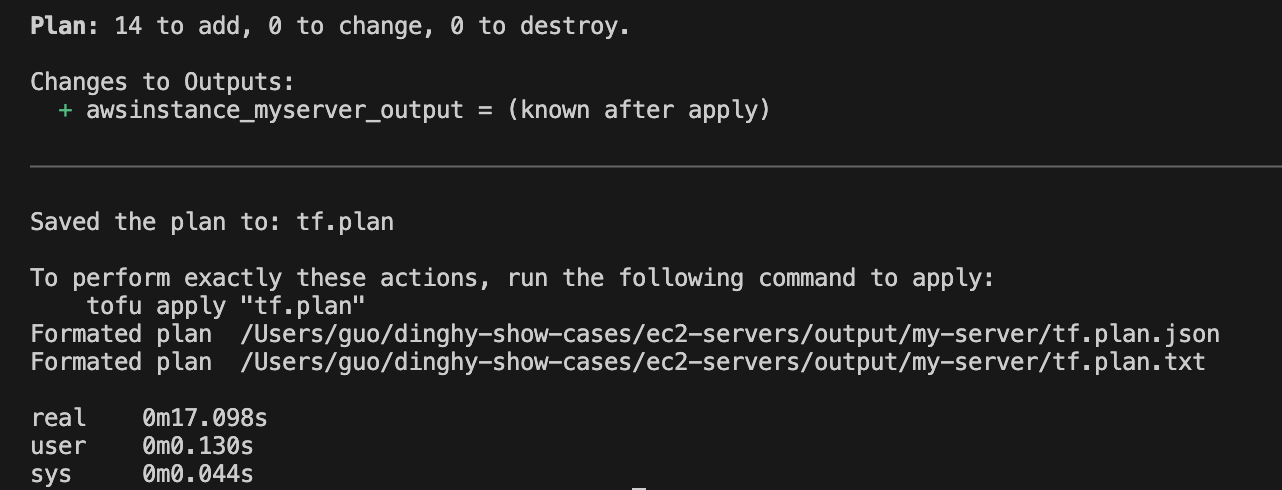
Run dinghy tf diff to preview the Terraform actions that will be performed.
info
Make sure your AWS credentials are configured before interacting with AWS services.
dinghy tf diff
Sample Screenshot
Apply the actions
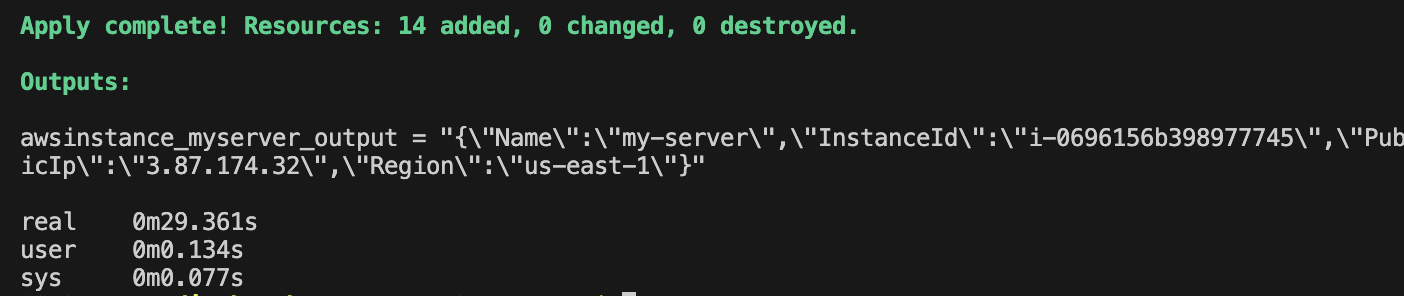
Run dinghy tf deploy to apply the changes and provision your resources.
dinghy tf deploy
Sample Screenshot
Access the server
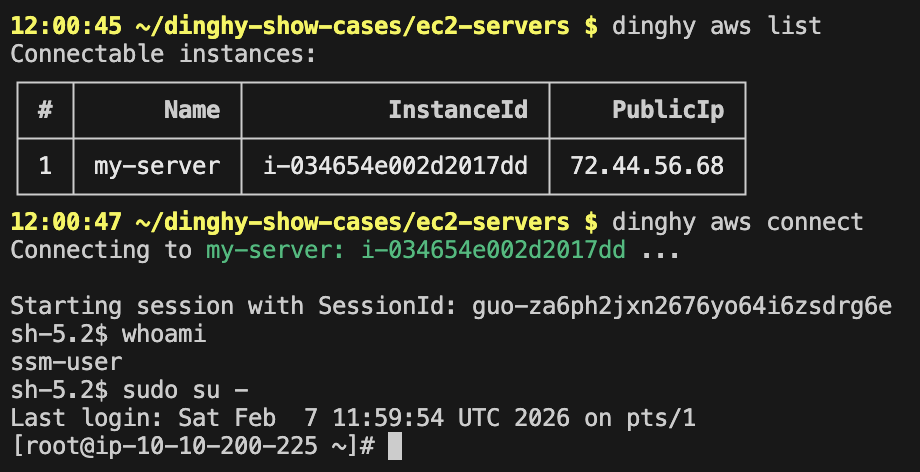
Once your EC2 server(s) are ready, you can connect to them easily:
- Run
dinghy aws listto see all EC2 instances. - Run
dinghy aws connectto start an interactive connection to any instance, with no additional setup needed 🪄
dinghy aws connect
Sample Screenshot
Destroy resources
After experimenting, run dinghy tf destroy to remove all resources created in the previous steps.