CloudFront Sites
CI/CD and drift detection with CloudFront Sites.
- Github project: dinghydev/dinghy-showcases-cloudfrontsites
- Deployed Site: https://cloudfront-site-demo.dinghy.dev/
Features
- Simplifies the deployment of static websites using AWS CloudFront and S3 with minimal configuration
- Provides secure and scalable hosting with integrated HTTPS using AWS ACM certificates
- Supports the multiple SSL certificates and certificate rotation workflow
- Automatically configures Route53 DNS records for custom domain support
- Supports redirection from alternate domains or custom paths
- Supports uploading static files to S3 buckets with customizable cache-control headers and MIME type settings
- Manages S3 bucket permissions and logging for security and compliance
- Enables CI/CD pipeline for site updates and supports drift detection for infrastructure consistency
- Generates clear Terraform code and visual infrastructure diagrams as output
Source Code
- dinghy-dev-demo-sites.tsx
- dinghy.config.yml
import { MoveToHere } from '@dinghy/base-components'
import { AwsStack } from '@dinghy/tf-aws'
import { CloudfrontSites } from '@dinghy/tf-aws/cloudfront'

export default () => (
  <AwsStack infrastructure={<MoveToHere includes='AwsRoute53Zone' />}>
    <CloudfrontSites />
  </AwsStack>
)
awsStack:
  title: dinghy.dev Demo Sites
  s3Backend: true
  logBucket: true
s3Bucket:
  loggingEnabled: true
awsProvider:
  region: eu-west-1
sites:
  cloudfront-site-demo.dinghy.dev:
    origins:
      site_root:
        target: 's3://dinghy-dev-demo-sites-origin'
    redirectFromNames:
      - '*.cloudfront-site-demo.dinghy.dev'
    certVersions:
      - '20260104'
    custom_error_response:
      - error_code: 403
        response_code: 404
        error_caching_min_ttl: 3600
        response_page_path: /404.html
Outputs
- Overview
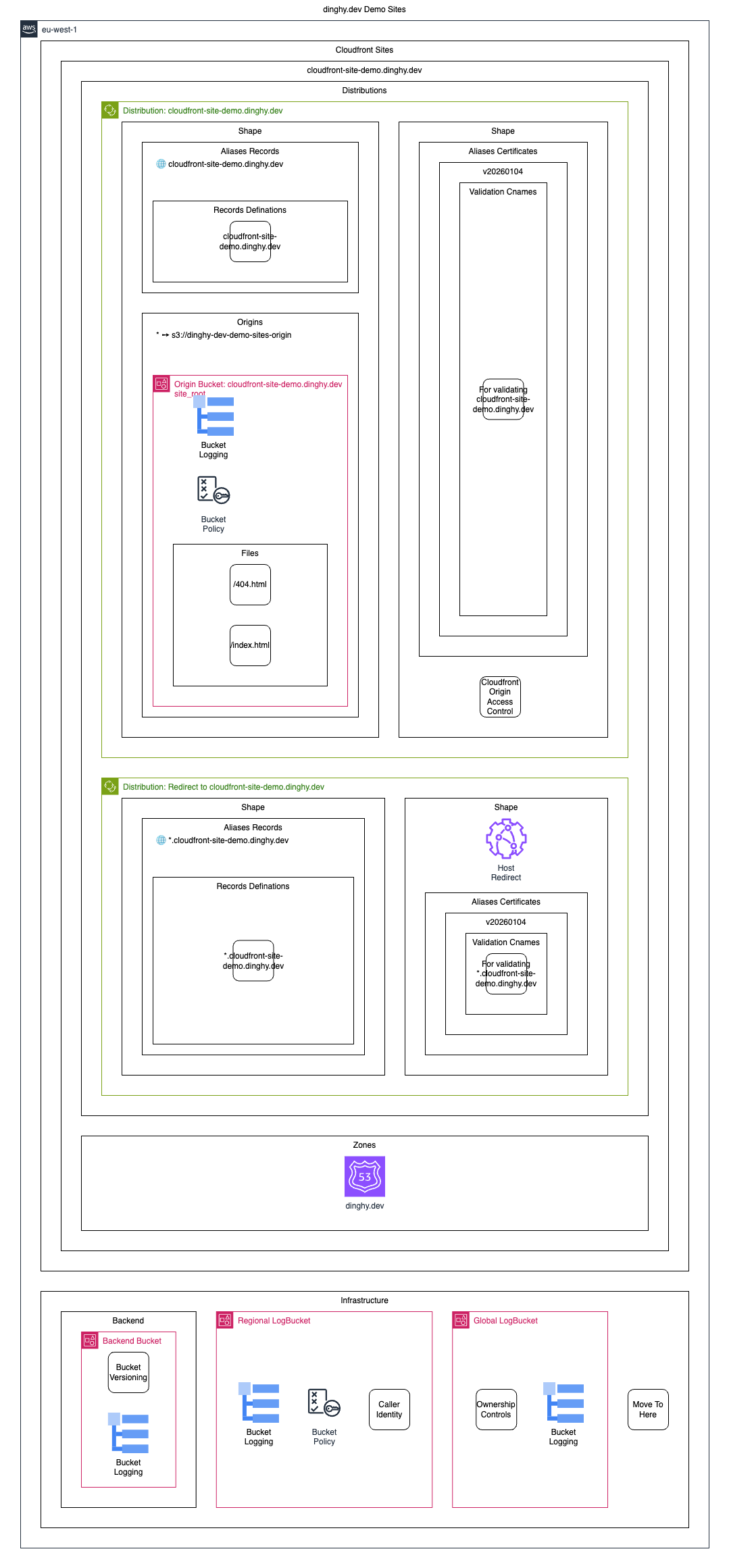
- All View
- Terraform
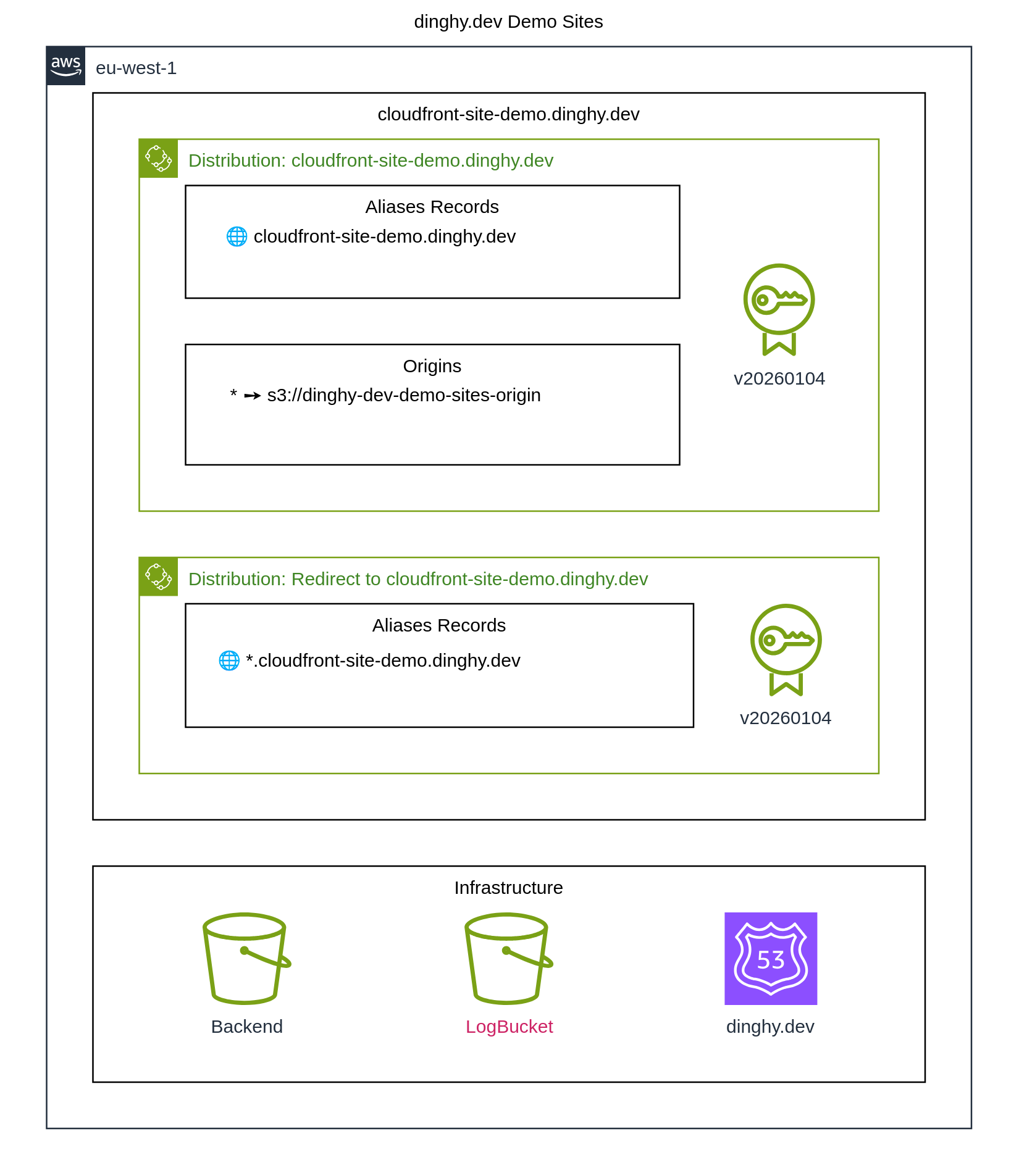
All elements without filter
stack.tf.json
{
  "provider": {
    "aws": [
      {
        "region": "eu-west-1",
        "default_tags": {
          "tags": {
            "iac:stack-title": "Dinghy Dev Demo Sites",
            "iac:stack-name": "dinghy-dev-demo-sites"
          }
        }
      }
    ]
  },
  "terraform": {
    "required_providers": {
      "aws": {
        "source": "aws",
        "version": "6.44.0"
      }
    },
    "backend": {
      "s3": {
        "bucket": "dinghy-dev-demo-sites-backend",
        "key": "dinghy-dev-demo-sites/dinghy-dev-demo-sites.tfstate.json",
        "region": "eu-west-1"
      }
    }
  },
  "resource": {
    "aws_cloudfront_distribution": {
      "cloudfrontsitedemodinghydev_site": {
        "default_cache_behavior": {
          "allowed_methods": [
            "GET",
            "HEAD"
          ],
          "cached_methods": [
            "GET",
            "HEAD"
          ],
          "target_origin_id": "site_root",
          "viewer_protocol_policy": "redirect-to-https",
          "cache_policy_id": "658327ea-f89d-4fab-a63d-7e88639e58f6",
          "function_association": [],
          "lambda_function_association": []
        },
        "enabled": true,
        "origin": [
          {
            "origin_id": "site_root",
            "domain_name": "${aws_s3_bucket.cloudfrontsitedemodinghydev_site_root_bucket.bucket_regional_domain_name}",
            "origin_path": "",
            "origin_access_control_id": "${aws_cloudfront_origin_access_control.cloudfrontsitedemodinghydev_originaccesscontrol.id}"
          }
        ],
        "restrictions": {
          "geo_restriction": {
            "restriction_type": "none"
          }
        },
        "viewer_certificate": {
          "acm_certificate_arn": "${aws_acm_certificate.cloudfrontsitedemodinghydev_site_20260104_certificate.arn}",
          "minimum_protocol_version": "TLSv1.2_2021",
          "ssl_support_method": "sni-only"
        },
        "aliases": [
          "cloudfront-site-demo.dinghy.dev"
        ],
        "comment": "cloudfront-site-demo.dinghy.dev",
        "custom_error_response": [
          {
            "error_caching_min_ttl": 3600,
            "error_code": 403,
            "response_code": 404,
            "response_page_path": "/404.html"
          }
        ],
        "logging_config": {
          "bucket": "${aws_s3_bucket.awss3bucket_globallogbucket.bucket_domain_name}",
          "prefix": "cloudfront-accesslog/cloudfrontsitedemodinghydev_site/"
        },
        "ordered_cache_behavior": [],
        "depends_on": [
          "aws_s3_bucket.cloudfrontsitedemodinghydev_site_root_bucket",
          "aws_cloudfront_origin_access_control.cloudfrontsitedemodinghydev_originaccesscontrol",
          "aws_acm_certificate.cloudfrontsitedemodinghydev_site_20260104_certificate",
          "aws_s3_bucket.awss3bucket_globallogbucket"
        ],
        "tags": {
          "Name": "Distribution: cloudfront-site-demo.dinghy.dev",
          "iac:id": "cloudfrontsitedemodinghydev_site"
        }
      },
      "cloudfrontsitedemodinghydev_redirect": {
        "default_cache_behavior": {
          "allowed_methods": [
            "GET",
            "HEAD"
          ],
          "cached_methods": [
            "GET",
            "HEAD"
          ],
          "target_origin_id": "site_root",
          "viewer_protocol_policy": "redirect-to-https",
          "cache_policy_id": "658327ea-f89d-4fab-a63d-7e88639e58f6",
          "function_association": [
            {
              "event_type": "viewer-request",
              "function_arn": "${aws_cloudfront_function.cloudfrontsitedemodinghydev_redirect_function.arn}"
            }
          ],
          "lambda_function_association": []
        },
        "enabled": true,
        "origin": [
          {
            "origin_id": "site_root",
            "domain_name": "${aws_s3_bucket.cloudfrontsitedemodinghydev_site_root_bucket.bucket_regional_domain_name}",
            "origin_path": "",
            "origin_access_control_id": "${aws_cloudfront_origin_access_control.cloudfrontsitedemodinghydev_originaccesscontrol.id}"
          }
        ],
        "restrictions": {
          "geo_restriction": {
            "restriction_type": "none"
          }
        },
        "viewer_certificate": {
          "acm_certificate_arn": "${aws_acm_certificate.cloudfrontsitedemodinghydev_redirect_20260104_certificate.arn}",
          "minimum_protocol_version": "TLSv1.2_2021",
          "ssl_support_method": "sni-only"
        },
        "aliases": [
          "*.cloudfront-site-demo.dinghy.dev"
        ],
        "comment": "Redirect to cloudfront-site-demo.dinghy.dev",
        "custom_error_response": [
          {
            "error_caching_min_ttl": 3600,
            "error_code": 403,
            "response_code": 404,
            "response_page_path": "/404.html"
          }
        ],
        "logging_config": {
          "bucket": "${aws_s3_bucket.awss3bucket_globallogbucket.bucket_domain_name}",
          "prefix": "cloudfront-accesslog/cloudfrontsitedemodinghydev_redirect/"
        },
        "depends_on": [
          "aws_cloudfront_function.cloudfrontsitedemodinghydev_redirect_function",
          "aws_s3_bucket.cloudfrontsitedemodinghydev_site_root_bucket",
          "aws_cloudfront_origin_access_control.cloudfrontsitedemodinghydev_originaccesscontrol",
          "aws_acm_certificate.cloudfrontsitedemodinghydev_redirect_20260104_certificate",
          "aws_s3_bucket.awss3bucket_globallogbucket"
        ],
        "tags": {
          "Name": "Distribution: Redirect to cloudfront-site-demo.dinghy.dev",
          "iac:id": "cloudfrontsitedemodinghydev_redirect"
        }
      }
    },
    "aws_route53_record": {
      "cloudfrontsitedemodinghydev_arecord": {
        "name": "cloudfront-site-demo.dinghy.dev",
        "type": "A",
        "zone_id": "${data.aws_route53_zone.dataawsroute53zone_dinghydev.id}",
        "alias": {
          "name": "${aws_cloudfront_distribution.cloudfrontsitedemodinghydev_site.domain_name}",
          "zone_id": "${aws_cloudfront_distribution.cloudfrontsitedemodinghydev_site.hosted_zone_id}",
          "evaluate_target_health": false
        },
        "depends_on": [
          "aws_cloudfront_distribution.cloudfrontsitedemodinghydev_site"
        ]
      },
      "cloudfrontsitedemodinghydev_validation_cname": {
        "name": "${one([\n  for dvo in aws_acm_certificate.cloudfrontsitedemodinghydev_site_20260104_certificate.domain_validation_options :\n  dvo if dvo.domain_name == \"cloudfront-site-demo.dinghy.dev\"\n]).resource_record_name}",
        "type": "CNAME",
        "zone_id": "${data.aws_route53_zone.dataawsroute53zone_dinghydev.id}",
        "allow_overwrite": true,
        "records": [
          "${one([\n  for dvo in aws_acm_certificate.cloudfrontsitedemodinghydev_site_20260104_certificate.domain_validation_options :\n  dvo if dvo.domain_name == \"cloudfront-site-demo.dinghy.dev\"\n]).resource_record_value}"
        ],
        "ttl": 60
      },
      "star_cloudfrontsitedemodinghydev_arecord": {
        "name": "*.cloudfront-site-demo.dinghy.dev",
        "type": "A",
        "zone_id": "${data.aws_route53_zone.dataawsroute53zone_dinghydev.id}",
        "alias": {
          "name": "${aws_cloudfront_distribution.cloudfrontsitedemodinghydev_redirect.domain_name}",
          "zone_id": "${aws_cloudfront_distribution.cloudfrontsitedemodinghydev_redirect.hosted_zone_id}",
          "evaluate_target_health": false
        },
        "depends_on": [
          "aws_cloudfront_distribution.cloudfrontsitedemodinghydev_redirect"
        ]
      },
      "star_cloudfrontsitedemodinghydev_validation_cname": {
        "name": "${one([\n  for dvo in aws_acm_certificate.cloudfrontsitedemodinghydev_redirect_20260104_certificate.domain_validation_options :\n  dvo if dvo.domain_name == \"*.cloudfront-site-demo.dinghy.dev\"\n]).resource_record_name}",
        "type": "CNAME",
        "zone_id": "${data.aws_route53_zone.dataawsroute53zone_dinghydev.id}",
        "allow_overwrite": true,
        "records": [
          "${one([\n  for dvo in aws_acm_certificate.cloudfrontsitedemodinghydev_redirect_20260104_certificate.domain_validation_options :\n  dvo if dvo.domain_name == \"*.cloudfront-site-demo.dinghy.dev\"\n]).resource_record_value}"
        ],
        "ttl": 60
      }
    },
    "aws_s3_bucket": {
      "cloudfrontsitedemodinghydev_site_root_bucket": {
        "bucket": "dinghy-dev-demo-sites-origin",
        "tags": {
          "Name": "Origin Bucket: cloudfront-site-demo.dinghy.dev site_root",
          "iac:id": "cloudfrontsitedemodinghydev_site_root_bucket"
        }
      },
      "awss3bucket_globallogbucket": {
        "bucket": "dinghy-dev-demo-sites-logs-global",
        "region": "us-east-1",
        "tags": {
          "Name": "Global LogBucket",
          "iac:id": "awss3bucket_globallogbucket"
        }
      },
      "awss3bucket_backend": {
        "bucket": "dinghy-dev-demo-sites-backend",
        "object_lock_enabled": true,
        "tags": {
          "Name": "Backend Bucket",
          "iac:id": "awss3bucket_backend"
        }
      },
      "awss3bucket_logbucket": {
        "bucket": "dinghy-dev-demo-sites-logs-eu-west-1",
        "tags": {
          "Name": "LogBucket",
          "iac:id": "awss3bucket_logbucket"
        }
      }
    },
    "aws_s3_bucket_logging": {
      "cloudfrontsitedemodinghydev_site_root_bucket_logging": {
        "depends_on": [
          "aws_s3_bucket.cloudfrontsitedemodinghydev_site_root_bucket"
        ],
        "bucket": "dinghy-dev-demo-sites-origin",
        "target_bucket": "dinghy-dev-demo-sites-logs-eu-west-1",
        "target_prefix": "s3-access-log/dinghy-dev-demo-sites-origin/"
      },
      "awss3bucket_backend_logging": {
        "depends_on": [
          "aws_s3_bucket.awss3bucket_backend"
        ],
        "bucket": "dinghy-dev-demo-sites-backend",
        "target_bucket": "dinghy-dev-demo-sites-logs-eu-west-1",
        "target_prefix": "s3-access-log/dinghy-dev-demo-sites-backend/"
      }
    },
    "aws_s3_bucket_policy": {
      "cloudfrontsitedemodinghydev_site_root_bucket_policy": {
        "depends_on": [
          "aws_s3_bucket.cloudfrontsitedemodinghydev_site_root_bucket"
        ],
        "bucket": "dinghy-dev-demo-sites-origin",
        "policy": "{\"Version\":\"2008-10-17\",\"Id\":\"PolicyForCloudFrontPrivateContent\",\"Statement\":[{\"Sid\":\"AllowCloudFrontServicePrincipal\",\"Effect\":\"Allow\",\"Principal\":{\"Service\":\"cloudfront.amazonaws.com\"},\"Action\":\"s3:GetObject\",\"Resource\":\"arn:aws:s3:::dinghy-dev-demo-sites-origin/*\",\"Condition\":{\"ArnLike\":{\"AWS:SourceArn\":[\"${aws_cloudfront_distribution.cloudfrontsitedemodinghydev_site.arn}\"]}}}]}"
      },
      "awss3bucket_logbucket_policy": {
        "bucket": "dinghy-dev-demo-sites-logs-eu-west-1",
        "policy": "{\"Version\":\"2012-10-17\",\"Statement\":[{\"Effect\":\"Allow\",\"Principal\":{\"Service\":\"logging.s3.amazonaws.com\"},\"Action\":\"s3:PutObject\",\"Resource\":\"arn:aws:s3:::dinghy-dev-demo-sites-logs-eu-west-1/*\"},{\"Effect\":\"Allow\",\"Principal\":{\"Service\":\"logging.s3.amazonaws.com\"},\"Action\":\"s3:GetBucketAcl\",\"Resource\":\"arn:aws:s3:::dinghy-dev-demo-sites-logs-eu-west-1\"},{\"Effect\":\"Allow\",\"Principal\":{\"Service\":\"delivery.logs.amazonaws.com\"},\"Action\":\"s3:PutObject\",\"Resource\":\"arn:aws:s3:::dinghy-dev-demo-sites-logs-eu-west-1/*\",\"Condition\":{\"StringEquals\":{\"aws:SourceAccount\":\"${data.aws_caller_identity.caller_identity.account_id}\"}}}]}"
      }
    },
    "aws_s3_object": {
      "dinghydevdemositesorigin_404html": {
        "depends_on": [
          "aws_s3_bucket.cloudfrontsitedemodinghydev_site_root_bucket"
        ],
        "bucket": "dinghy-dev-demo-sites-origin",
        "cache_control": "max-age=3600, public, must-revalidate",
        "content_type": "text/html; charset=UTF-8",
        "etag": "${filemd5(\"/workspace/cloudfront-sites/s3-files/dinghy-dev-demo-sites-origin/404.html\")}",
        "source": "/workspace/cloudfront-sites/s3-files/dinghy-dev-demo-sites-origin/404.html",
        "key": "/404.html",
        "tags": {
          "Name": "/404.html",
          "iac:id": "dinghydevdemositesorigin_404html"
        }
      },
      "dinghydevdemositesorigin_indexhtml": {
        "depends_on": [
          "aws_s3_bucket.cloudfrontsitedemodinghydev_site_root_bucket"
        ],
        "bucket": "dinghy-dev-demo-sites-origin",
        "cache_control": "max-age=3600, public, must-revalidate",
        "content_type": "text/html; charset=UTF-8",
        "etag": "${filemd5(\"/workspace/cloudfront-sites/s3-files/dinghy-dev-demo-sites-origin/index.html\")}",
        "source": "/workspace/cloudfront-sites/s3-files/dinghy-dev-demo-sites-origin/index.html",
        "key": "/index.html",
        "tags": {
          "Name": "/index.html",
          "iac:id": "dinghydevdemositesorigin_indexhtml"
        }
      }
    },
    "aws_acm_certificate": {
      "cloudfrontsitedemodinghydev_site_20260104_certificate": {
        "lifecycle": {
          "ignore_changes": [
            "subject_alternative_names",
            "domain_name"
          ]
        },
        "domain_name": "cloudfront-site-demo.dinghy.dev",
        "region": "us-east-1",
        "subject_alternative_names": [],
        "tags": {
          "iac:id": "cloudfrontsitedemodinghydev_site_20260104_certificate",
          "Name": "v20260104"
        },
        "validation_method": "DNS"
      },
      "cloudfrontsitedemodinghydev_redirect_20260104_certificate": {
        "lifecycle": {
          "ignore_changes": [
            "subject_alternative_names",
            "domain_name"
          ]
        },
        "domain_name": "*.cloudfront-site-demo.dinghy.dev",
        "region": "us-east-1",
        "subject_alternative_names": [],
        "tags": {
          "iac:id": "cloudfrontsitedemodinghydev_redirect_20260104_certificate",
          "Name": "v20260104"
        },
        "validation_method": "DNS"
      }
    },
    "aws_cloudfront_origin_access_control": {
      "cloudfrontsitedemodinghydev_originaccesscontrol": {
        "name": "oac-cloudfrontsitedemodinghydev",
        "origin_access_control_origin_type": "s3",
        "signing_behavior": "always",
        "signing_protocol": "sigv4"
      }
    },
    "aws_cloudfront_function": {
      "cloudfrontsitedemodinghydev_redirect_function": {
        "lifecycle": {
          "ignore_changes": [
            "name"
          ]
        },
        "code": "\n              function handler(event) {\n                var request = event.request;\n                \n                var newUrl = 'https://cloudfront-site-demo.dinghy.dev';\n                var response = {\n                  statusCode: 301,\n                  statusDescription: 'Moved Permanently',\n                  headers: {\n                    'location': { value: newUrl }\n                  }\n                };\n                return response;\n              }",
        "name": "cloudfrontsitedemodinghydev_redirect_function",
        "runtime": "cloudfront-js-2.0",
        "publish": true
      }
    },
    "aws_s3_bucket_ownership_controls": {
      "awss3bucket_globallogbucket_ownership_controls": {
        "depends_on": [
          "aws_s3_bucket.awss3bucket_globallogbucket"
        ],
        "bucket": "dinghy-dev-demo-sites-logs-global",
        "rule": {
          "object_ownership": "BucketOwnerPreferred"
        },
        "region": "us-east-1"
      }
    },
    "aws_s3_bucket_versioning": {
      "awss3bucket_backend_versioning": {
        "depends_on": [
          "aws_s3_bucket.awss3bucket_backend"
        ],
        "bucket": "dinghy-dev-demo-sites-backend",
        "versioning_configuration": {
          "status": "Enabled"
        }
      }
    }
  },
  "data": {
    "aws_route53_zone": {
      "dataawsroute53zone_dinghydev": {
        "name": "dinghy.dev"
      }
    },
    "aws_caller_identity": {
      "caller_identity": {}
    }
  }
}
Resource types
List of resource types used by this stack, in approximate order of creation:
- aws_s3_bucket
- aws_s3_bucket_versioning
- aws_s3_bucket_logging
- aws_s3_bucket_policy
- aws_s3_bucket_ownership_controls
- aws_s3_object
- data.aws_caller_identity
- data.aws_route53_zone
- aws_acm_certificate
- aws_route53_record
- aws_route53_record
- aws_cloudfront_function
- aws_cloudfront_distribution
- aws_cloudfront_origin_access_control
Workflows
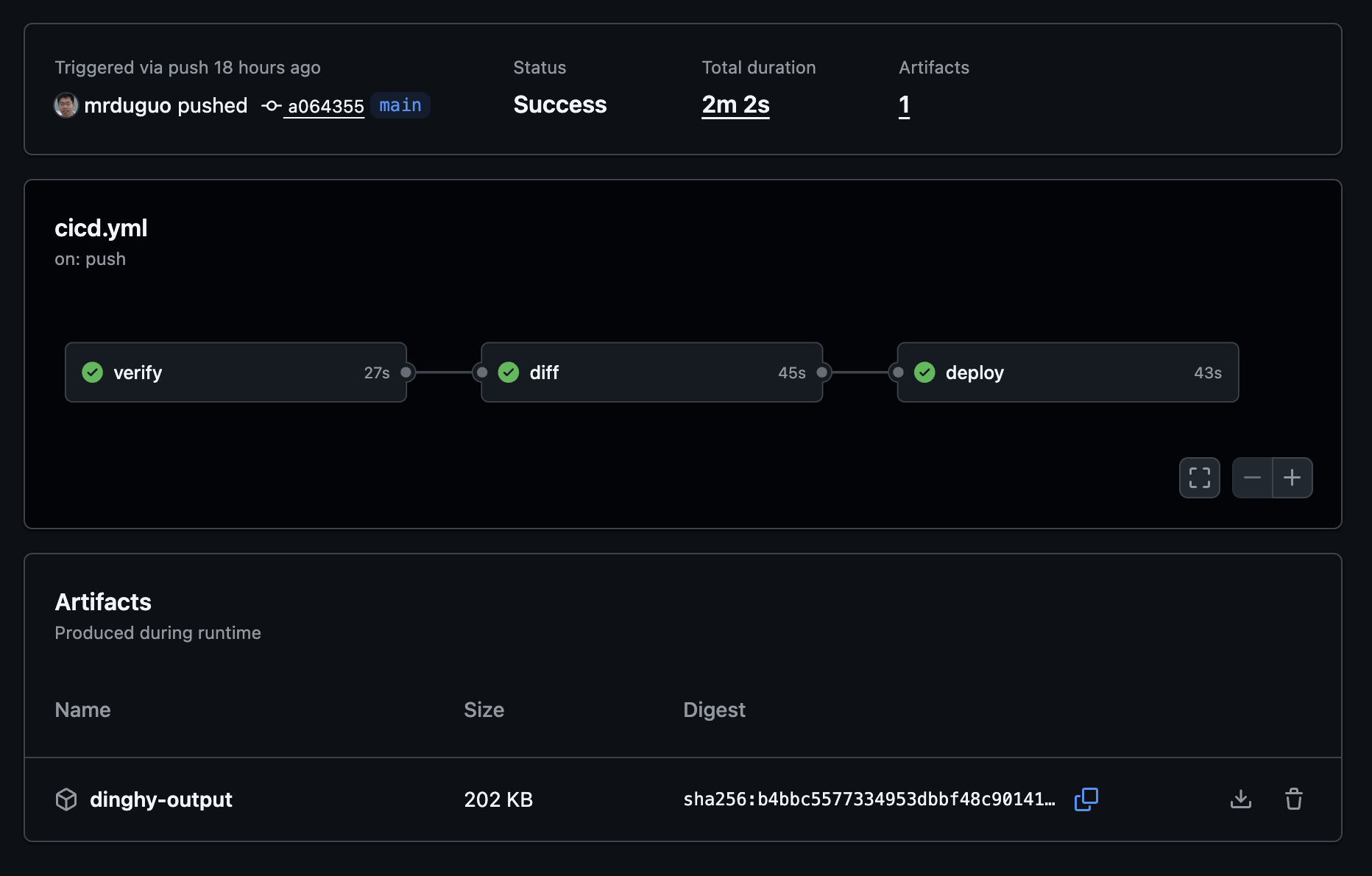
CI/CD
Github CI/CD workflow: 
Sample Screenshot
Drift Detection
Github Drift Detection workflow with manual approval to deploy: 
Sample Drift Detection Screenshot
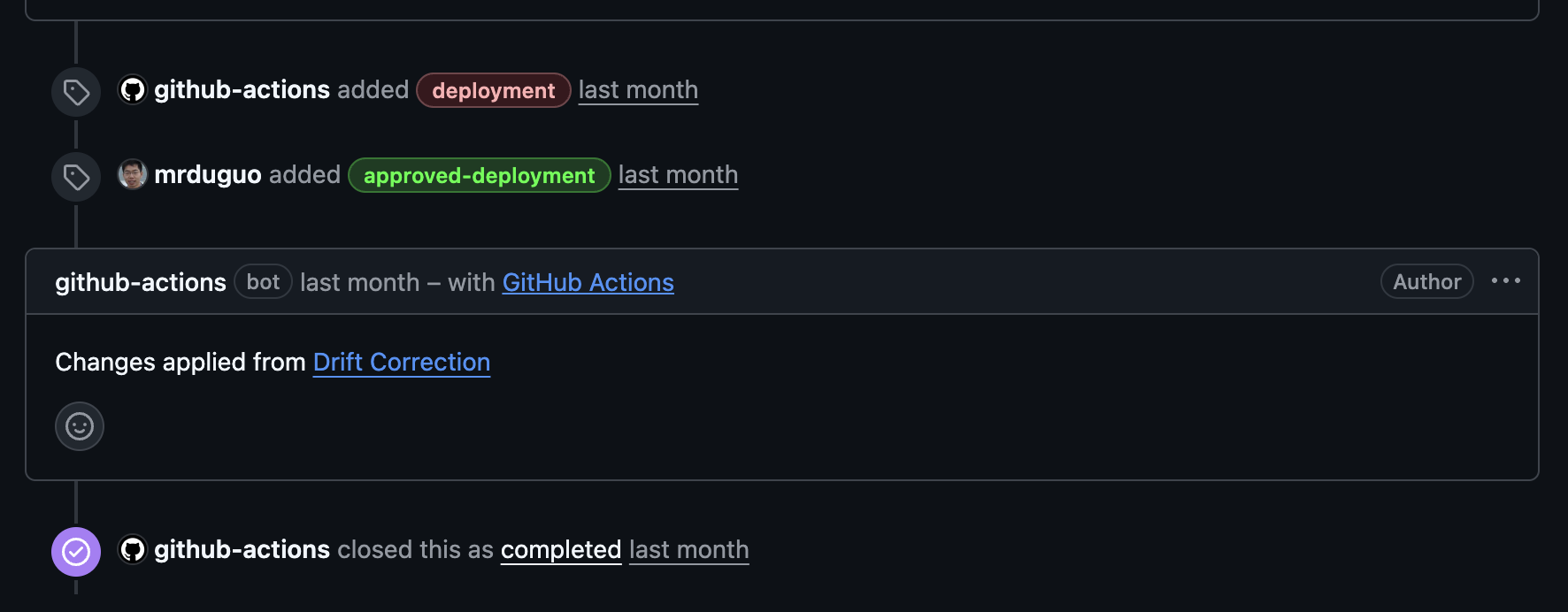
When drift is detected, a Manual Approval Issue will be created, allowing you to manually trigger the correction workflow:
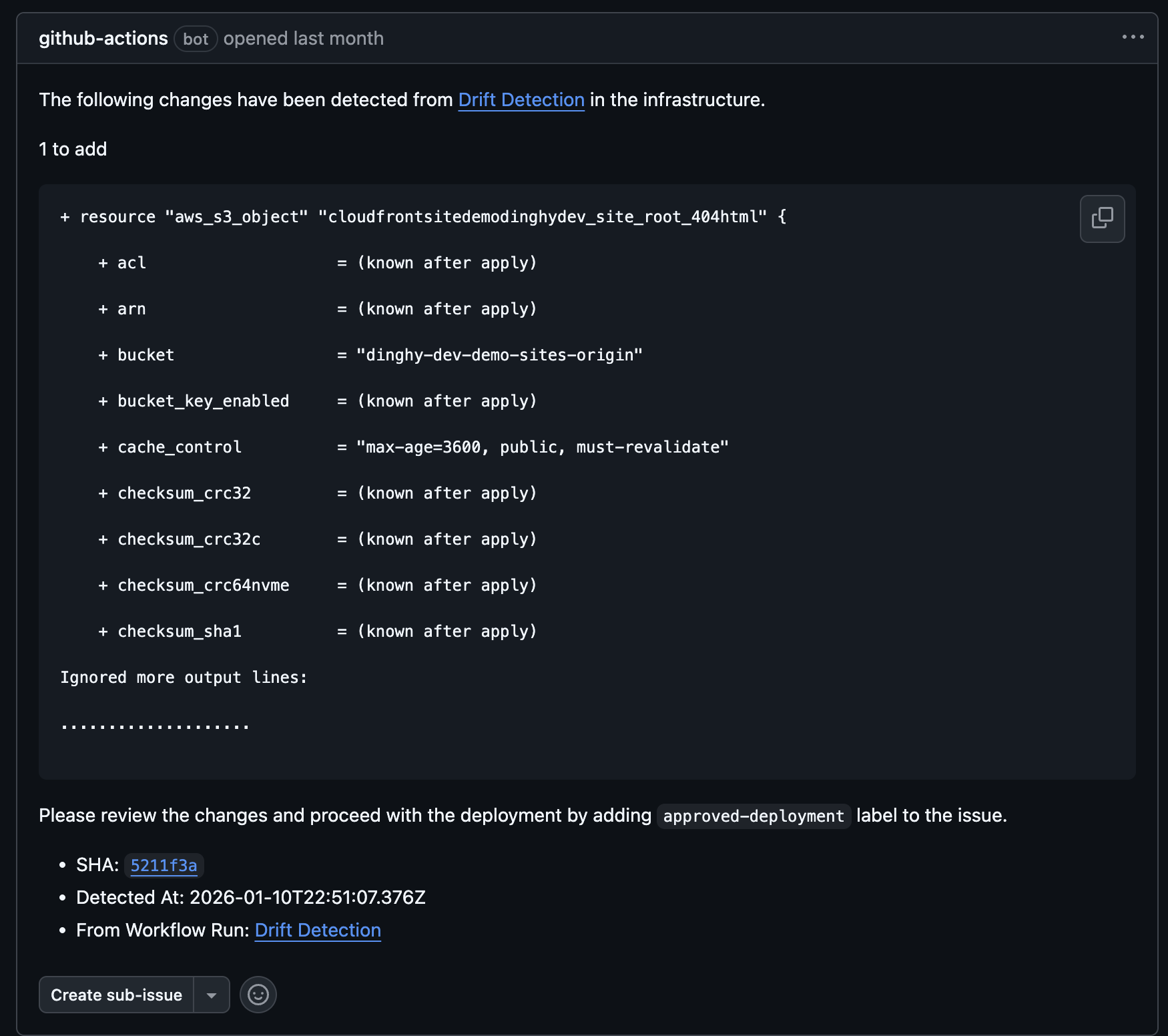
After you add the approved-deployment label to the issue, the Drift Correction workflow will be triggered:
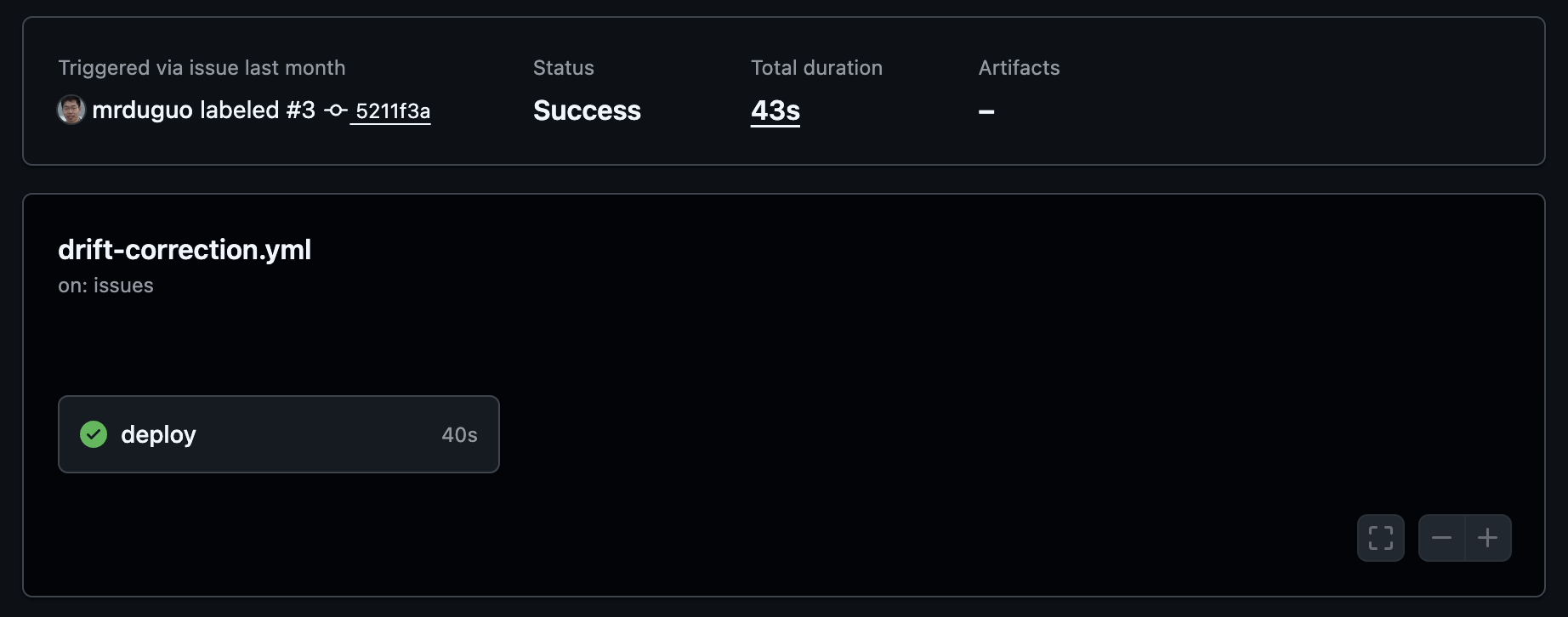
After the correction workflow completes successfully, it will automatically close the associated issue: