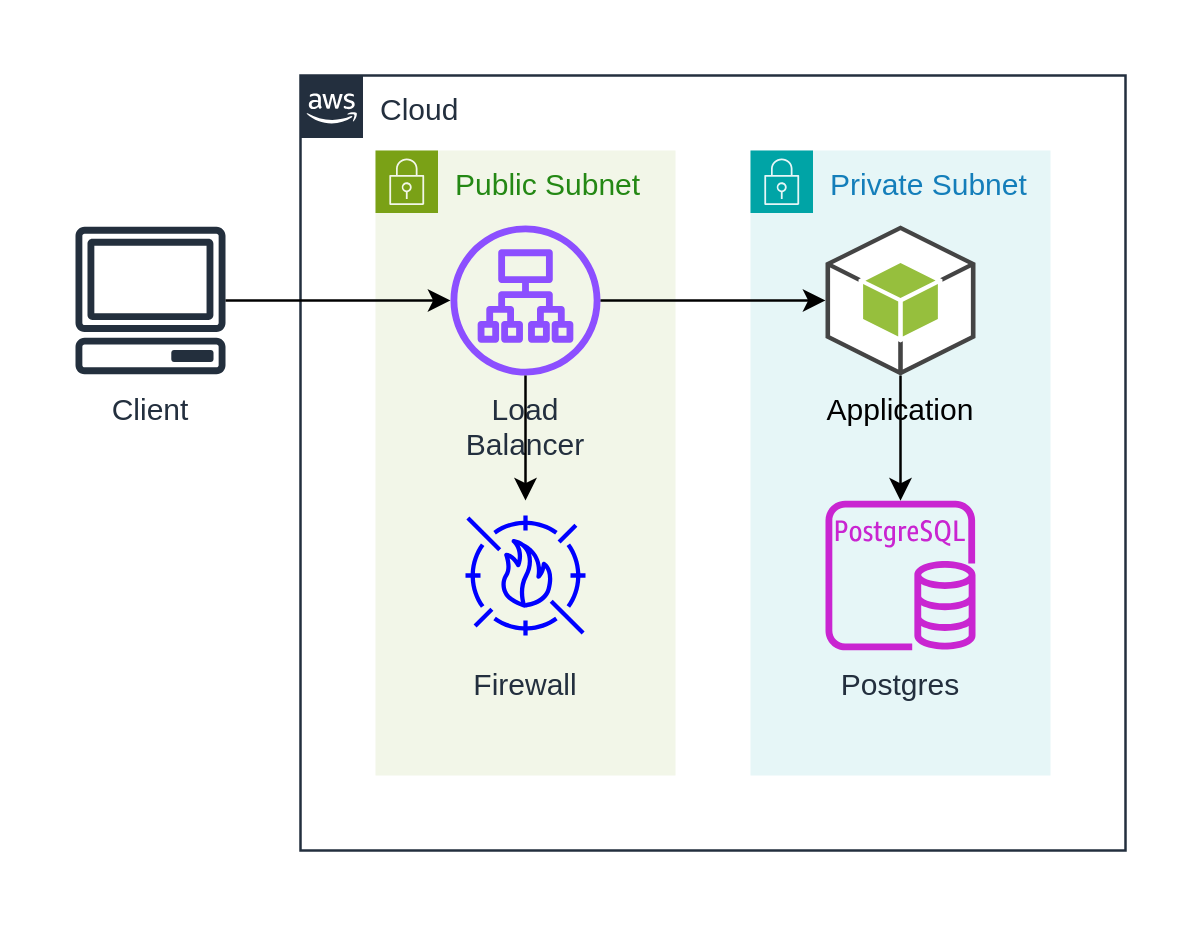
Step 3: draw.io
This example use draw.io shapes from @dinghy/diagrams to
replace basic shape for the components so it looks nicer. It generate the same
structure as previous Step 1: Basic Shape
- Source
- Diagram
app.tsx
import { Shape } from '@dinghy/base-components'
import { Android } from '@dinghy/diagrams/entitiesAws17Sdk'
import * as awsGeneralResources from '@dinghy/diagrams/entitiesAwsGeneralResources'
import * as awsGroups from '@dinghy/diagrams/containersAwsGroups'
import { PostgreSqlInstance } from '@dinghy/diagrams/entitiesAwsDatabase'
import { ApplicationLoadBalancer } from '@dinghy/diagrams/entitiesAwsNetworkContentDelivery'
import { Waf } from '@dinghy/diagrams/entitiesAwsSecurityIdentityCompliance'

export default () => (
  <WebApp>
    <Client />
    <Cloud>
      <PublicSubnet>
        <LoadBalancer />
        <Firewall />
      </PublicSubnet>
      <PrivateSubnet>
        <Application />
        <Postgres />
      </PrivateSubnet>
    </Cloud>
  </WebApp>
)

const Postgres = (props: any) => <PostgreSqlInstance {...props} />

const WebApp = (props: any) => <Shape {...props} _style={{ noLabel: 1 }} />

const Cloud = (props: any) => <awsGroups.AwsCloud {...props} />

const PublicSubnet = (props: any) => (
  <awsGroups.PublicSubnet _direction='vertical' {...props} />
)

const PrivateSubnet = (props: any) => (
  <awsGroups.PrivateSubnet _direction='vertical' {...props} />
)

const LoadBalancer = (props: any) => (
  <ApplicationLoadBalancer
    _dependsOn={['Firewall', 'Application']}
    {...props}
  />
)

const Firewall = (props: any) => (
  <Waf
    _style={{
      strokeColor: 'blue',
      fillColor: 'transparent',
    }}
    {...props}
  />
)

const Application = (props: any) => (
  <Android
    _dependsOn='Postgres'
    {...props}
  />
)

const Client = (props: any) => (
  <awsGeneralResources.Client
    _dependsOn='Load Balancer'
    {...props}
  />
)