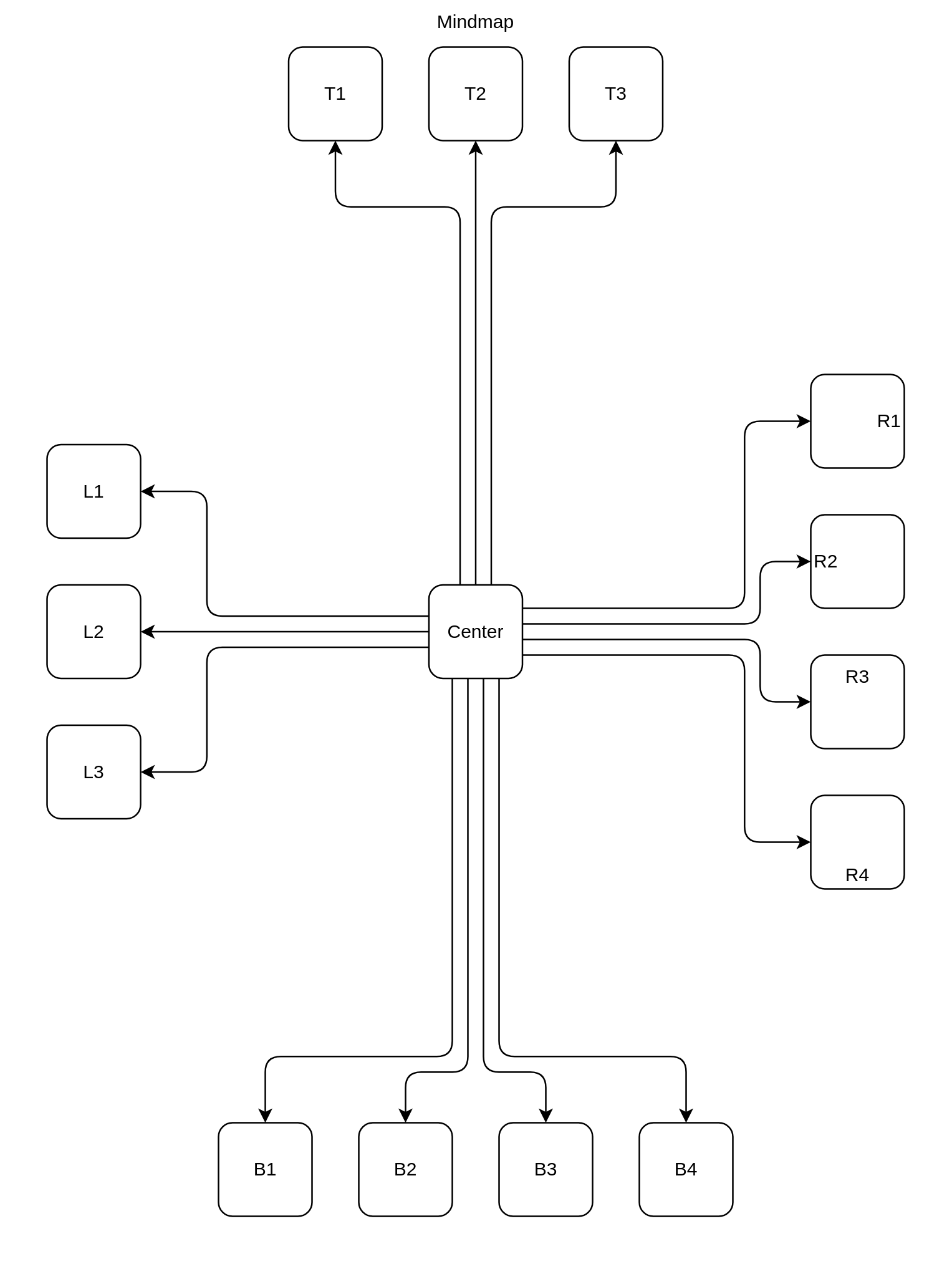
Mindmap
Not pretty mindmap, but show how shape could be arranged
- Source
- Diagram
app.tsx
import { Dependency, Shape } from '@dinghy/base-components'
export default () => (
  <Mindmap>
    <Row>
      Top
      <Shape>T1</Shape>
      <Shape>T2</Shape>
      <Shape>T3</Shape>
    </Row>
    <Row>
      <Column>
        Left
        <Shape>L1</Shape>
        <Shape>L2</Shape>
        <Shape>L3</Shape>
      </Column>
      <CenterMiddle>
        <Shape>
          Center
          <Dependencies />
        </Shape>
      </CenterMiddle>
      <Column>
        Right
        <Shape _align='right'>R1</Shape>
        <Shape _align='left'>R2</Shape>
        <Shape _verticalAlign='top'>R3</Shape>
        <Shape _verticalAlign='bottom'>R4</Shape>
      </Column>
    </Row>
    <Row _display={'invisible'}>
      Bottom
      <Shape>B1</Shape>
      <Shape>B2</Shape>
      <Shape>B3</Shape>
      <Shape>B4</Shape>
    </Row>
  </Mindmap>
)

const Mindmap = (props: any) => <Shape _direction={'vertical'} {...props} />
const Row = (props: any) => <Shape _display={'invisible'} {...props} />

const Column = (props: any) => <Row _direction={'vertical'} {...props} />

const CenterMiddle = (props: any) => (
  <Shape
    _width={400}
    _height={600}
    _distributed
    _display={'invisible'}
    {...props}
  />
)

const Dependencies = (props: any) => (
  <Dependency
    _dependsOn={[
      'T1',
      'T2',
      'T3',
      'B1',
      'B2',
      'B3',
      'B4',
      'L1',
      'L2',
      'L3',
      'R1',
      'R2',
      'R3',
      'R4',
    ]}
    _beforeGenerate={({
      _props: {
        _diagram: { flags, points },
      },
    }: any) => {
      const { arrowDirection } = flags
      const space = 50
      let dimension: 'x' | 'y'
      let diff: number
      switch (arrowDirection) {
        case 'down':
          dimension = 'y'
          diff = space * 2
          break
        case 'up':
          dimension = 'y'
          diff = 0 - space * 2
          break
        case 'right':
          dimension = 'x'
          diff = space
          break
        case 'left':
          dimension = 'x'
          diff = 0 - space
          break
      }
      points.map((p: any) => (p[dimension] += diff))
    }}
    {...props}
  />
)